Highlights of What’s new in the Windows Phone 7 Developer Tools RTM/RTW

It’s a big day for Microsoft and I’ve had a great ride to this point.

The RTM of the Windows Phone 7 Developer Tools have now been released.

See the update MSDN documentation.

Get the toolsBe sure to correctly uninstall previously installed versions of the tools (see the release notes) before installing.

Read the release notes.

Let’s take a look at the highlights of what’s new in RTM of the WP7 Developer Tools, largely from a Silverlight application development point of view.

Panorama Control

There have been a few 3rd party open source goes at a Panorama Control (and no-one can blame them for getting a little impatient – it’s like the Office ribbon), but now there’s an official one (which was explain recently in a blog entry by Jeff Wilcox).  You can include one by starting with the new dedicate Visual Studio template (under File->New Project), use the one in the toolbox, or add it via XAML.  See the documentation.  Use it to get UI like this:

Ff941104.83abaa3d-63cc-4424-b8ff-3c5ceca759c4(en-us,VS.92).jpg

Pivot Control

The new official Pivot control is just as easy to use.  See the documentation to produce things like this:

image


Bing Maps Silverlight Control for Windows Phone

While the previously available control worked on the phone, it was not optimized for the phone.  This new version rocks!  Check out the docs.  You’ll also want to get yourself a developer key.

Ff941093.10d7071a-c8bf-4a96-85d0-651438c449a6(en-us,VS.92).jpg

Other changes:

The tools and emulator have performance improvements.  Check out Microsoft’s paper on creating high performing Silverlight apps.

The documentation has been updated.

Be sure to read the release notes.

What’s missing to round out the platform? 

I’ll do another post on this topic soon.

My ride with Windows Phone 7

Today is the official day for the RTM of the Windows Phone 7 Developer Tools.

It’s a big day for Microsoft.

It’s been a big few weeks for me too recently.  I’ve just finished training dozens of developers in the first WP7 professional training event across North America.  I’ve recorded a few Dot Net Rocks TV episodes, presented and attended WP7 events with Microsoft (and more to come), and have been asked to author various articles. 

I’ve had the luxury (and support from Microsoft Canada) of having a developer device in my hands for a week or two and continue to have access to devices on occasion.  I’ve seen the device app-deployment unlock process and seen the RTM tools for a little while pre-release.  I did see quality, performance and personal preference differences between devices from a couple of phone manufacturers, but I can’t detail those as they were all prototype devices.  I’m looking forward to seeing the retail devices, and I think most of you will be quite satisfied.

I’m now quite familiar with the phone UI and interactions – it really doesn’t take long to get used to it.

I’m enjoying the ride.  I’ve been fortunate.

By the way, I’ve also had a go on a Kinect device and then pre-ordered mine right away – it’s worth it for the exercise alone!

I’d like to thank a few people at Microsoft Canada:

  • Joey deVilla – Microsoft blogger extraordinaire, go-to man for help getting your WP7 apps to marketplace, promoter of my boot camps and generous ring master of devices
  • Christian Beauclair – his mastery of the Microsoft way made it possible for he and I to have device access and enjoy a couple of trips to Montreal sharing the experience with developers there
  • Rick Claus – his generosity ensured I could keep my word with boot camp trainees
  • John Bristowe – pointing some great opportunities my way
  • John Oxley – for having my back and approving all the best parts

I’d also like to thank Carl Franklin at dnrTV and Nitin Bharti at DZone.

I’ll be giving back over the next few months by continuing to share what I’ve learnt at public events and on this blog.

A Big Day for Windows Phone 7

It’s a big day today for Microsoft with the RTM of the Windows Phone 7 developer tools – potentially the last kick at the can for raising a successful mobile platform, at least amongst the current market competitors.

Update: The tools are not available – get the highlights.  A CodePlex-hosted toolkit of additional controls is also available.

There has been a lot of buzz and packed-out WP7 events, but success will likely – rightly or wrongly -  be measured publically in terms of how many phones are sold, how many applications are published and how many applications are bought; and all against what iPhone has achieved.

Microsoft has a lot of money to spend on this launch, though my sense is that the spend will occur closer to device launch (late Oct/early Nov) and during H1 2011.  The compressed catch-up timescale has created the sense of a developer-device shortage. 

Microsoft’s OS development track has been very short, and there would not normally be an abundance of devices at this stage.  The problem is that the absolute timing is very close to the festive season and Microsoft has been rallying developers since February this year, creating an expectation of device access.  Also, one cannot discount the ‘have-to-hold-one’ feeling that people have, though my experience having one in hand to show people is that they are not that quick to have a go. 

The WP7 emulator (available for some time!) is an amazing thing (more adept than Virtual PC in some ways) and is likely sufficient for 90% of Silverlight applications and some XNA games (single-touch).  The emulator’s usefulness wanes when developing applications with multi-touch input unless the developer has a multi-touch display.  Also, anything with high performance animation or intense XNA games requires a real device to get a true sense of real-world performance. 

I’ll sum up device timing issues by saying, that if you are willing to invest in a application development track at the same speed that Microsoft is going (which is a new standard for Microsoft), then they’ll likely work with you to get you what you need to publish on time.

If you haven’t been involved with the WP7 euphoria yet, then you may easily fall into it.  The way I see it, most people out there are well on their way to being 100% WP7 developers and I now tend to break it down like this:

  • 25% if you are a .NET developer already
  • 25% if you are a Silverlight/WPF developer
  • 25% if you develop web services
  • 25% left over that is unique to the phone

There’s quite a lot in that last 25% and you’ll need to get up to speed on two major pieces to really work well on the platform:

  • Application Life Cycle – your application will fail miserably in the user’s eyes if you don’t support the necessary events
  • Push Notification Services – to keep data updated and get events from elsewhere you need to understand the mechanisms

Of course, having already training dozen of developers in the first professional WP7 boot camp across North America, I’m available for children’s birthday parties private training (which are the same thing once you’ve seen super hero training at a birthday party Smile) – see the about page – if your company needs to get up to speed quickly.

The developer tools are FREE – go and get them when they are released later today at http://developer.windowsphone.com.

3 Windows Phone 7 Developer events in Ottawa this coming week with a Developer Device!

3 Important Windows Phone 7 Events in Ottawa featuring a real developer device…

1 Microsoft Canada Windows Phone 7 Ottawa Deployment Clinic – Sep 1st 2010

So you have a WP7 application in development, but you need to see how it works on a real device ahead of the marketplace opening in October?

The emulator currently available as part of the Windows Phone Developer Tools Beta, provides a great testing environment for many, but not all, of the platform’s features.  The capabilities of your application may necessitate testing on a real device.  Devices are available to purchase at retail in the November so you may need access to a real device for testing in the meantime.

Over the next few months Microsoft Canada will be holding a series events in Ottawa where you can try out your WP7 apps on a real device.

The first one will be held at the Microsoft Ottawa office (5th floor at the World Exchange Plaza) on Wed Sep 1 2010.  To request a testing slot, please contact Christian Beauclair, let him know about your application and why you’d like to test on a real device.  You should bring along a developer machine if you’d like to make revisions while testing.

Not ready to test on a device yet?  Future events will be held at the office and at coffee and code events around town.  Watch http://colinizer.com and http://blogs.msdn.com/b/cdndevs/ for details.

2 DevTeach Windows Phone 7 Boot Camp Sep 2nd/3rd 2010
clip_image001

The phone tools RTM on Sep 16th, the marketplace opens in October and devices expected in November.

Do you have?

· The developer knowledge to build apps for this platform

· Access to device to test your application

· Assistance with getting your application in the marketplace.

With this boot camp you get::

· 2 solid workshop days to rapidly build your WP7 Developer knowledge and beyond – covering major topics in depth, samples, exercises and expertise in Microsoft technologies

· Face-time with a developer device

· 50!! Demos/Examples

· Priority invite to Microsoft Canada’s deployment clinics to test your application(s) on a real device unless you have a relationship with Microsoft, these events may be your only opportunity before retail device availability!!!

· FREE go-to-marketplace support from Microsoft to get your application into the marketplace and potential promotion – you’ll be connected with a Microsoft evangelist to help you with getting your application(s) into the marketplace with potential for application promotional

· Information, 40+ samples & exercises to walk away with

Register today!  Use the code WP7BOOTCAMP to save $100.

http://winphone7bootcamp.com

3 Microsoft Canada Windows Phone 7 Night in Ottawa (featuring a developer device!) – Sep 2nd 2010

Join Christian Beauclair & Rick Claus from Microsoft Canada, along with Colin Melia from DreamDigital, for an evening about Windows Phone 7 in the flesh.  That’s right, they’ll be there in person, oh and so will a real developer device!

In October, Microsoft will start accepting application submissions on the mobile marketplace for Windows Phone 7 applications, with devices being available at retail shortly thereafter.

Will you be one of the first developers selling a cool application? Are you an IT Pro that wants to figure out how these devices fit into your organization?  To get to grips with this new mobile platform and build on your existing .NET and infrastructure knowledge, you’ll need to know the features of the new phone platform.

Visual Studio 2010 together with the WP7 tools make building applications a delightful experience. During this evening event, you’ll have the opportunity to see the phone in action, learn about the tools and understand how the phone integrates into your enterprise.

You absolutely must be registered to attend.

Register here: https://www.clicktoattend.com/invitation.aspx?code=150519

In-Depth Developer Training, Samples, Marketplace Assistance, Promotion, Device Face-Time & Loaner Device Access for Windows Phone 7

Windows Phone 7 devices are coming to market this Oct/Nov in several markets.

Time is running out to get in on the launch and test device access is vital for some applications.

Get these benefits from the Windows Phone 7 Boot Camp that I’m running, sponsored by Microsoft at their Canadian offices:

  • 2 solid workshop days to rapidly build your WP7 Developer knowledge and beyond – covering major topics in depth, samples, exercises and expertise in Microsoft technologies
  • 50!! Demos/Examples
  • Priority invite to Microsoft Canada’s deployment clinics to test your application(s) on a real device unless you have a relationship with Microsoft, this may be your only opportunity before retail device availability!!!
  • FREE go-to-marketplace support from Microsoft to get your application into the marketplace and potential promotion – you’ll be connected with a Microsoft evangelist to help you with getting your application(s) into the marketplace with potential for application promotional
  • Information, 40+ samples & exercises to walk away with

Due to a shortage with devices, Microsoft Canada has withdrawn the loaner program (substituting the deployment clinics) and a device cannot be present in all bootcamp cities.

There are many free resources on the web, but none offer these benefits along with interactive learning.

Want More?  How about, all this for less?  Use the promo code WP7BOOTCAMP to get $100 off.

Register today.

Live Meeting Presentation Today on Windows Phone 7 + OData + Silverlight + Azure

image

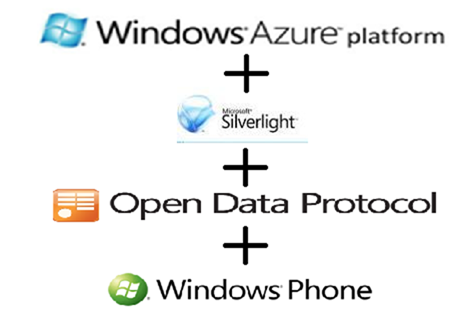
I’m doing a 1.5 hour Live Meeting presentation today at 16:00 ET on these hot topics for the Windows Azure User Group

The audience objectives include:

  • Learn key features of Silverlight, OData & the Windows Azure Platform
  • Learn about preparing an application for use with Windows Azure & SQL Azure
  • Learn stages and ways to deploy a full application to the Windows Azure Platform
  • Learn how Silverlight can interact with Windows Azure Platform technologies.

Register for this hot-topic event and participate remotely.

https://www.clicktoattend.com/invitation.aspx?code=147804

If you are looking for in-depth rapid training on developing for Windows Phone 7 development AND hands-on time with a device, then you should consider registering for the this major 2-day boot camp running across Canada.

Windows Phone 7 Boot Camp

Quick-Start Primer Video to Windows Phone 7 Tools, Data Access and Notification Services

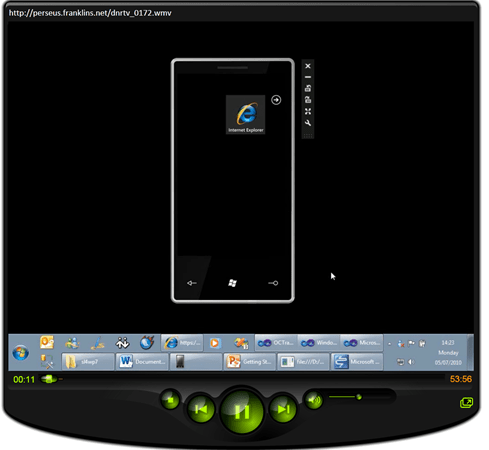
I recently did a 1-hour screencast interview with Carl Franklin for Dot Net Rocks TV.

It’s a good primer for a few areas of Windows Phone 7 developer.

20100720 video

If you are looking for in-depth rapid training on developing for Windows Phone 7 then you should consider registering for this first major boot camp running across Canada.

Windows Phone 7 Boot Camp

The recording was done using the April refresh of the tools.  I’ll be following up with another one soon using the Beta tools to explain things like themes and application life cycle in more detail.

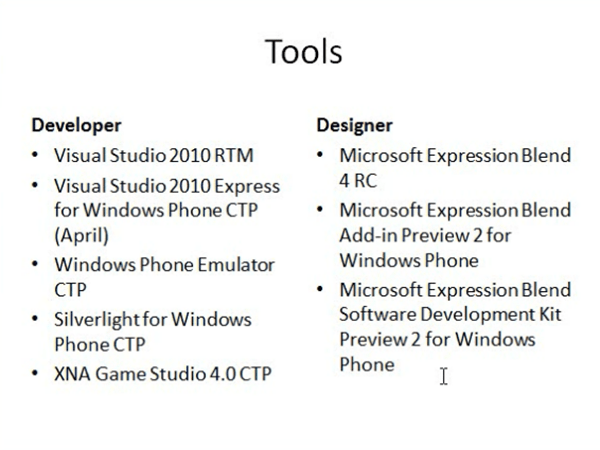
We covered the tools…

20100720 tools

The emulator…

20100720 emulator

Project types…

20100720 project types


Visual Studio Tools…

20100720 vstools

Mapping Applications…

20100720 mapapp

Data Binding/Access… to a service exposed through Windows Azure AppFabric Service Bus

20100720 dataaccess

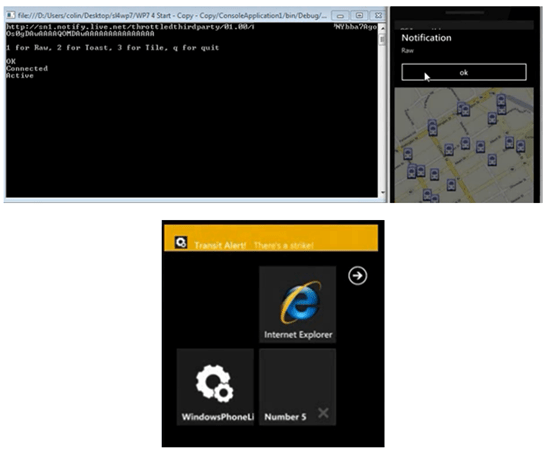
Notification Services which is essential to building applications that receive information from the cloud.


20100720 notification

Hopefully the video gives you a good sense of what is possible, and if you want this speed of knowledge transfer or faster… go for the bootcamp.

Windows Phone 7 Boot Camp

Navigating Bus Stops with Open Data and Windows Phone 7

In a recent post I talked about Bringing Azure+OData+Silverlight Goodness to Open Data Apps in Ottawa.  To do this, I imported standardized transportation data (that I found for the city of Ottawa) into a SQL database and exposed it as OData using WCF Data Services on an Entity Framework model.  I subsequently published a sample database to Windows Azure to demonstrate use of the data in an adapted Silverlight application that uses the Open Data Application Framework.

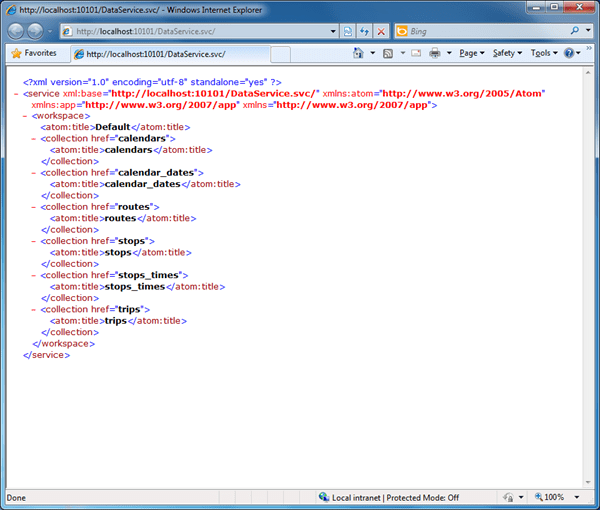
The OData information is accessible through a RESTful interface.  Here are the root entities displayed in IE.

20100606 odata

Last Thursday evening, I did a presentation on building Silverlight applications for Windows Phone 7.  Given that there’s an OData client library CTP available for Windows Phone 7, I knocked up a Bus Stop ulity application to demonstrate to my audience.  To get started with Silverlight applications on WP7 you can download the free developer tools (vs. the designer tools which are extensions for Blend 4 RC currently) currently the April CTP version.  The developer tools also include the XNA Game Studio for creating XNA-based games.

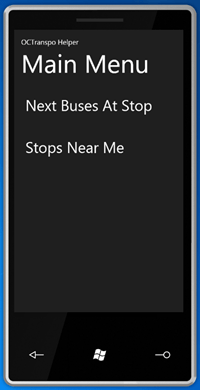
Here’s are the two main features I set up…

20100606 menu

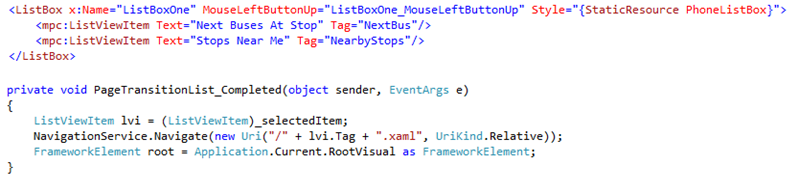
Do create my menu I went with the list-based project template and then replaced the listbox content with manual entries with tag values.  These tags are then used as the names of the XAML files to load.  Quick and dirty, but it works…

20100606 listcode

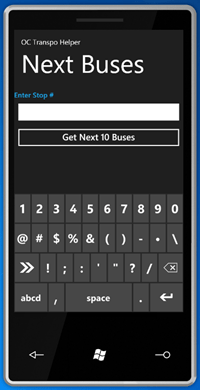
Selecting the first option brings up a screen that allows the user to enter a bus stop (by its number as displayed on bus stop signs in Ottawa) and then lookup the trip heading and time of the the next 10 buses stopping at that stop.

When declaring the text box to enter the number, the attribute settings InputScope="Number" is used to default the standard input panel to the number entry mode.  The "TelephoneNumber" value may have also been acceptable (to bring up the phone keypad keyboard with bigger numbers) since many people request this kind of information using their telephone and its keypad.

20100606 entry

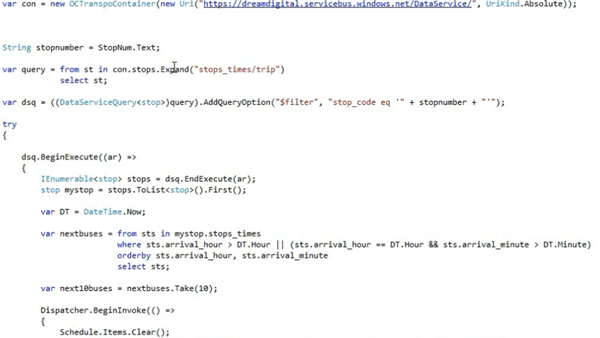
The application then uses a proxy class derived from DataServiceContext (and created using the DataSvcUtil command line tool since the WP7 add-in for VS2010 Pro does not currently provide an Add Service Reference option on a project) to query the OData service (running locally or on Azure).

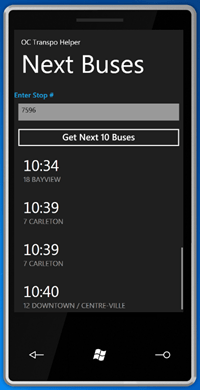
The results come back and use the very flexible ListViewItem control (with its Metro styling) to display the results, making use of Layout="TextAndDetails".

20100606 times

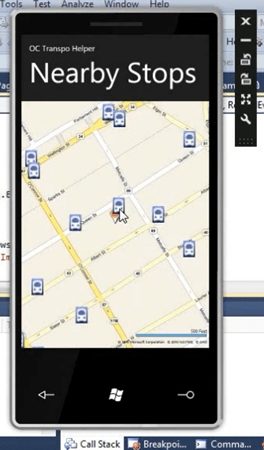
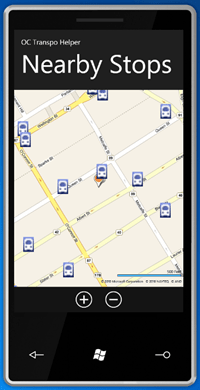
If the user had gone to the other main menu option, they’d be presented with this screen.

20100606 nearby

This shows their ‘current’ location and the bus stops nearby.  Again this calls the OData service using filter parameters to bring back only bus stops that are within a 1km block of the location.  The map shown is the Bing Maps Silverlight control set to Road mode – the same one as used for desktop Silverlight apps – and the bus stop icons are added as children to the map control with attached properties specifying their locations.  The navigation controls where turned off to maximise space, so I added two Windows Phone 7 Applicaiton Bar to allow the user to zoom in and out.  The user can pan around with their finger of course.  The bus stop icons could easily be made actionable in some way. 

Since the WP7 emulator has no GPS, the location was hard coded in.  One of the samples in the WP7 SDK shows how to use Reactive Extensions to simulate location information in a way that is easily switched later to real device data. 

While this kind of application needs fairly accurate location data, others don’t.  Perhaps just knowing the city would be enough if one had just landed in that city and wanted general information.  The location APIs for WP7 allow the developer to easily make a choice between slow and accurate (while the device GPS locks on to satellites) or quick and less accurate (by using available Wifi and mobile network information in conjunction with Microsoft’s cloud-based location services).

Once WP7 devices are released, and the city officially publishes this data set I’d expect a fleshed out and polished application of this kind to be quickly available ;-).

Quick Tip: Add OData to your Windows Phone 7 CTP Silverlight Application in VS2010 RC

So you downloaded the cool new tools for Windows Phone 7 Development and you want to connect to one of those amazing OData feeds… (okay probably just the NetFlix one right now), but perhaps you’ve hit a snag or need a little help getting started..

First point:

You need OData client support, so:

  • Download the OData client for WP7
  • Run the downloaded file to extract a copy of System.Data.Services.Client.
  • Add a reference to the DLL to your project.
  • Add an imports/using state for System.Data.Services.Client.

Second point:

If you are still using the VS2010 RC (which you probably are as of today, as the current WP7 phone CTP is not compatible with the new VS2010 RTM), then you may have had a problem with “Add Service Reference”, specifically that it’s not appearing…

From the release notes:

The Add Service Reference option is not supported in the Windows Phone add-in to Visual Studio 2010. Workaround: Use Visual Studio 2010 Express for Windows Phone to add service references

So you can open up your project with VS 2010 Express for WP, which should also be on your machine.  However, if you have a solution with other projects, they may not be supported in the Express SKU… life is getting complicated.

So, you can easily add the reference manually:

  • Open the VS2010 command prompt from the Start menu.
  • CD to your project directory
  • Issue a command similar to: datasvcutil /uri:http://odata.netflix.com/Catalog/ /dataservicecollection /language:CSharp /Version:2.0 /out:NetFlixRef.cs
  • Use Add Existing Item to add in the the proxy class (in this case NetFlixRef.cs). 
  • You then add an imports/using statement for the namespace in the class and off you go…
  • Add code similar to this to get started on the binding…

var Container = new SomeContainer(new Uri("http://odata.netflix.com/Catalog/", UriKind.Absolute));

var query = linq query on SomeContainer.SomeEntitySet;

var collection = new DataServiceCollection<SomeProxyEntity>();

someListBox.ItemsSource = collection;

collection.LoadAsync(query);

  • … and then bind away in your XAML.

quick Review of Mix10 Day 1 Keynote

Due to flight delays I didn’t make it for the Day 1 keynote, so I couldn’t live blog it.  I will post more on the keynote contents later.  Overall, there were NO surprises (and sadly no phone hardware).  A Silverlight 4 RC was released along with development tools for Windows Phone 7 Series.  Installing the Windows Phone 7 tools (was straightforward, though the lack of a standalone installer is a little inconvenient).

The Microsoft wifi at the event is great considering the sea of laptops here.

I’ll be live tweeting (@colinizer) for Day 2.

Today’s keynote is likely going to be about IE9 and design – not as exciting as yesterday.