Silverlight Sample Application – Part 3

In this series blog post I’m continuing to talk about the sample Silverlight application that was used in the Ottawa and Toronto code camps this year.

You can get the source to the application on CodePlex.

The purpose of the application (other than to show people how to get started with Silverlight application development), was to be an IT event information application.  The third ‘page’ (yes – I’ll get to the second page in the next post) of the application shows tweets about the event.

Since the Ottawa and Toronto code camps happen in April and May, here’s the same page set up to show tweets tagged with #teched for this month’s Microsoft TechEd confeference.
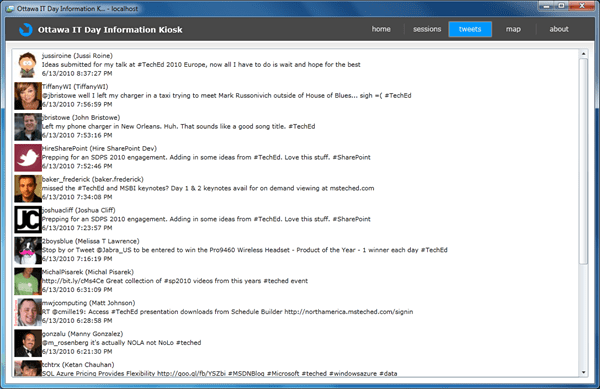
20100613 tweets

To get the data, we can use one of the great methods available in Silverlight to get data – the WebClient class.  This class is often used when you are connecting to a RESTful service which is documented somewhere but is not self-described with metadata (like many SOAP/OData web service where Add Service Reference in Visual Studio can often be used to create a proxy class).

All network data access in Silveright must be asynchronous to avoid the UI from freezing up.

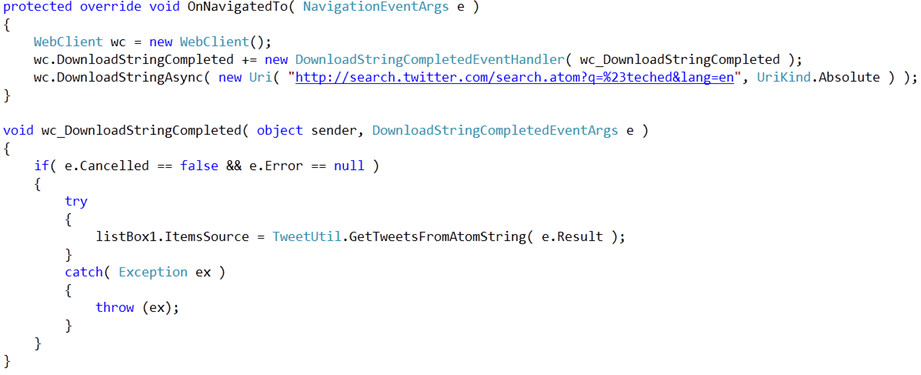
We create out WebClient, setup a completion event handler and start an asynchronous download of a string using the Twitter Search API.
20100613 tweet behind

Once the completion event fires, we make sure there’s no error and then pass off processing of the received string to a utility function to get back objects we can bind to on our ListBox.

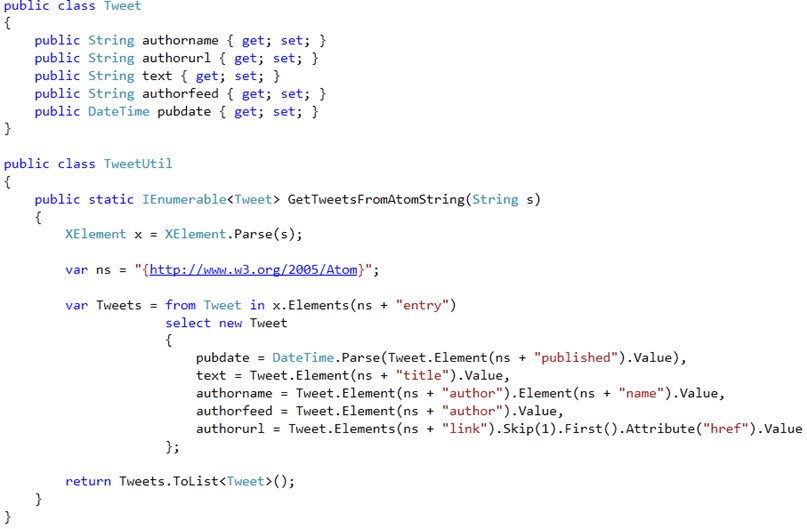
The Twitter Search API response format is document (or discoverable at least) so we set up a class to hold the items of a tweet we are interested in, and use LINQ to XML code to pull out the appropriate XML elements from the Twitter API Atom feed.
 20100613 tweet util

It’s that simple when you get the hang of LINQ to XML.  It’s a must learn for the modern .NET developer.

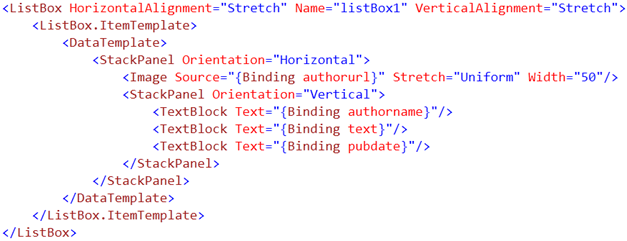
With objects to bind to we need to create a DataTemplate for our ListBox ItemTemplate (the template used every time the visual tree for a new item needs to be generated).
20100613 tweet xaml

And there you have it.  It’s surprising there aren’t even more Twitter Clients coming out of the woodwork.

Check out other series blog posts for more information about this sample application.
Silverlight Sample Application – Part 2

In this series blog post I’m continuing to talk about the sample Silverlight application that was used in the Ottawa and Toronto code camps this year.

You can get the source to the application on CodePlex.

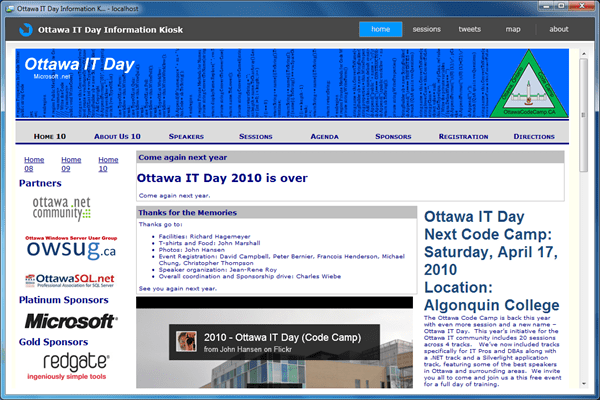
The purpose of the application (other than to show people how to get started with Silverlight application development), was to be an IT event information application.  The first ‘page’ of the application shows the event website.

20100613 home

To do this, our page simply includes the web browser control in the XAML…

20100613 webbrowser

and a bit of code in the code-behind class also inheriting from the provided Page class constructor.

20100613 webbrowser 2

Simple enough right?

Wrong.

This code will fail when you try to debug/launch the application in a web browser.  The web browser control requires the application to be installed out-of-browser by the user and with elevated full trust.

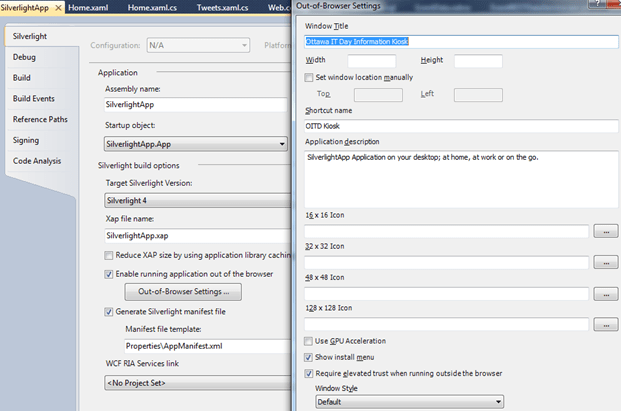
20100613 oob

In the project properties, running Out-of-Browser needs to be enabled, the settings configured and the “Require elevated trust when running outside the browser” needs to be checked.

So HTML content and be hosted alongside the Silverlight control in a web page, but to host HTML content inside the Silverlight control you need the user to agree to the elevated trust and run the application outside of the browser.

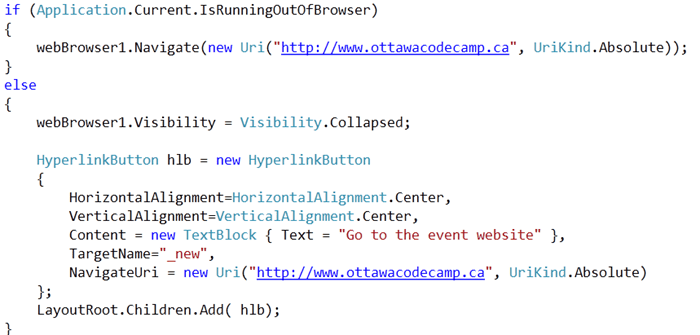
To avoid making this page useless when the application is run inside the web browser, code was added as follows:

20100613 oob detect

This code detects if the code is running out of browser or not.  If it’s in-browser then the browser control is hidden, and a hyperlink control added to the main grid allowing the user to click it and be taken to a web page using their default web browser.

Be sure to check out the other features a Silverlight 4 application can use if it runs out of browser.

Check out other series blog posts for more information about this sample application.

Exploring OData with Silverlight

Silverlight 4 includes native support for accesing OData-compatible data service, but it can be hard to use the entities exposed by such services without being able to explore the data and confirm the range and semantics of the data.

Well, you can use the OData URL query syntax to dive through the XML in your browser (yum!), or you could create an application to more visually show the data. 

Both of those are less than optimal for initial exploration, and why bother, when there’s a tool that lets you start exploring.

The OData Explorer sample application provides a good way to explore a specific OData-compatible service and also provides a list of some of the public compatible services.

The tool can be found here: http://www.silverlight.net/content/samples/odataexplorer/

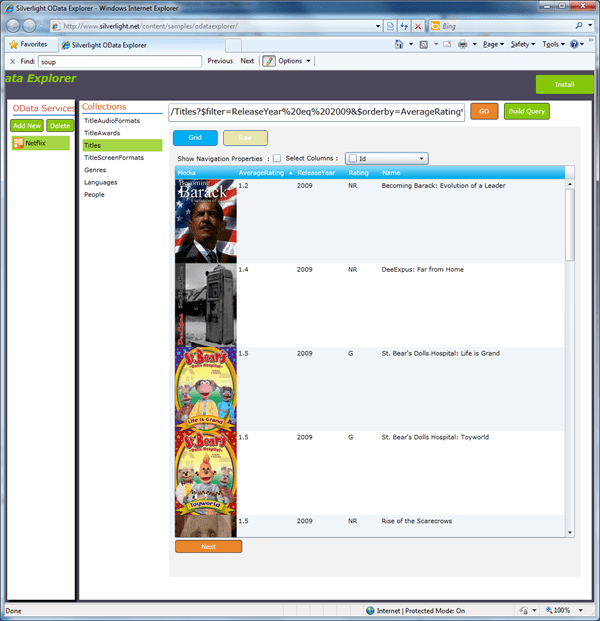
As an example, one can use it to explore the Netflix service at http://odata.netflix.com/Catalog/ and try out a query like this:

/Titles?$filter=ReleaseYear%20eq%202009&$orderby=AverageRating%20asc&$select=AverageRating,ReleaseYear,Rating,Name

This provides the lowest rated NetFlix titles in 2009… hmm… interesting results…

Give it a go 🙂

silveright od x 1

Released Today: Silverlight 4 RTW, Tools RC & Blend 4 Preview Update

Silverlight 4 went RTW (Release to Web) today – you can find it on the silverlight.net site.

What was not widely discussed is the fact that the Silverlight 4 Tools for Visual Studio 2010 release is officially an Release Candidate, not yet officially an RTW quite yet, though may be declared one if no major issues are found.

Scott Guthrie detailed this in the Channel 9 Live broadcast following the Silverlight 4 launch event.  Go to the Silverlight 4 launch video and select the Channel 9 Live On Demand option, then skip ahead to 01:34:30 where he talks about these 3 things.

Silverlight 4 Final Release on 15th 2010

Today, during the Day 2 Keynote of the DevConnections event in Las Vegas, Microsoft announced that Silverlight 4’s final release will be on April 15th this week and available to download.

I think many people were hoping for a release today, but oh well…

Today’s live streamed keynote included demonstrations of Silverlight 4’s features and associated productivity enhancements in Visual Studio 2010.

Note that there will also be an ‘RC’ Tools release for Visual Studio and an Expression Blend 4 Preview update.

quick Review of Mix10 Day 1 Keynote

Due to flight delays I didn’t make it for the Day 1 keynote, so I couldn’t live blog it.  I will post more on the keynote contents later.  Overall, there were NO surprises (and sadly no phone hardware).  A Silverlight 4 RC was released along with development tools for Windows Phone 7 Series.  Installing the Windows Phone 7 tools (was straightforward, though the lack of a standalone installer is a little inconvenient).

The Microsoft wifi at the event is great considering the sea of laptops here.

I’ll be live tweeting (@colinizer) for Day 2.

Today’s keynote is likely going to be about IE9 and design – not as exciting as yesterday.

Silverlight 4 Sample Source Code from PDC 2009 Now Available

Head over to the blog of Microsoft’s Corp VP Scott Guthrie for the details on getting the source code for the demos he used in his PDC 2009 Day 2 Keynote.

These demos include local webcam still and recording capture with effects, a barcode reading demo, rich text support and the ever popular jigsaw puzzle brush demo but this time with a live embedded web page that can even contain a live flash movie!

A notable omission is the code for the Facebook integrated app.  That demo showed an application that ‘picked up’ picture files from a memory card storing pictures of the PDC audience just takes with a camera.  I couldn’t find the help resources for this kind of ‘device access’ feature that was announced.  I’m thinking that perhaps this feature was not included in the publically downloadable beta.  Scott did say that the Facebook app sample would ship later, but I guess not just yet.

Microsoft Tech Days Canada

Today was the 2nd and final day of Microsoft’ Tech Days conference in Ottawa (the 6th city on the 7-city tour).  I had the opportunity to speak about two great topics:

What’s new in Silverlight 3

This talk focused on new features in Silverlight 3.  It was clear that many people have yet to take a look at any version of Silverlight.  This made for a fun challenge – trying to explain new features, while also explaining Silverlight basics, and say how it compares to JQuery with HTML 5.  Ottawa’s government-worker-centric population may explain the results of my straw-poll survey with the audience.  The snow-storm in the morning made a little dent in attendance, and given the audience make-up, a general introduction session for Silverlight would likely have received a bigger audience (and would probably still do so a year from now when talking about what’s new in Silverlight 4).

Optimizing your apps for the Windows 7 user experience. 

This session seemed to get a very positive response, most likely due to the fact that the Windows API Code Pack is available which provides managed wrappers to the Windows 7 native APIs such that making use of new Windows 7 features (like the Taskbar) is practically trivial.


It was a great experience working with the Microsoft Canada guys and my friends in the community.  I look forward to doing so again next year on topics such as Silverlight 4, Azure, Office 2010, VS2010/.NET 4.0, and hopefully in multiple cities.

Silverlight 4 Beta Available

Oh yes – announced at PDC yesterday.

I think perhaps March 22nd with VS 2010 fir the RC or final at a squeeze.  According to Scott Guthrie, the RC may have more hardware accelerateion.

Silverlight 4 features:

  • Webcam & Microphone on the machine (including raw access); multi-cast streaming; offline DRM support
  • Printing; rich text; clipboard access; right click; mouse wheel; implicit styles; drag/drop; bidi & rtl; html hosting (including content as brush); commanding/mvvm; additional controls (including rich text)
  • Compile once, use in both SL and .NET 4; UDP multicast (p2p); rest protocol enhancements; improved WCF support (inc. TCP channel support); RIA Services; works better with OData (Astoria)
  • Offline features include: Windowing APIs; Notification popups; HTML hosting; Drop Target
  • New offline ‘elevated’ features include: Custom Windows Chrome, Local File System, Cross-Site Network; Keyboard in Full Screen Mode; Hardware Device Access; COM Automation of local objects (and location APIs).
  • Twice as fast; 30% faster startup; new profiling support
  • Support for Google Chrome.
  • Under 5MB to install.
  • Will ship the Silverlight 4 Facebook-integration demo as reference sample
  • 70% of voted-for Silverlight 4 features (including 9 of top 10) included

Visual Studio 2010 Silverlight support: WYSIWYG Design Surface (not news), XAML IntelliSense Improvements; Improvements for Data Binding, Layout & Styles; WCF RIA Services Integration

Check out the PDC sessions (video showing up in the near future) on Silverlight 4:

Check out further PDC coverage

PDC09 Announcements – Day 2 Keynote

Blogged live – now completed.

Check out further PDC coverage

Background

  • Everything is about 3 screens (desktop, phone and TV) and the cloud.
  • Day 1 focus – Backend, i.e. Azure.
  • Day 2 focus – Office, Silverlight & Windows focus on Day 2.
  • Microsoft emphasis will be on IE + Silverlight for all 3 screens – desktop, phone and TV.

Announcements

  • Not going to announce Windows 8 stuff in the interests of being ‘responsible’ and ensuring that what is disclosed is actionable – not ready for that yet.
  • FREE Windows 7 ‘PDC laptop’ (Acer machine with Microsoft’s preferred software image, resistive multi-touch, accelerometer) available to all paying PDC attendees (!!!).  Conditions apply ;).  Is this Oprah?
  • ‘3 weeks’ into IE 9 development – Standards progress (HTML 5); performance improvements in JavaScript; Hardware-accelerated DirectWrite/Direct2D Graphics & Text
  • IE9 already on 32/100 on Acid3 test, up from 20/100 on IE8
  • Channel9 videos on IE9 being posted today
  • Silverlight will be used this Winter for Victoria’s Secret Fashion Show and Winter Olympics
  • Silverlight will be used by Bloomberg, National Instruments, Siemens (medical diagnostic imaging)
  • Silverlight now on 45% of the world’s internet-connected devices (up from 33% in the summer)
  • Silverlight 4 – Media, Business Applications, Beyond the Browser
  • Silverlight 4: Webcam & Microphone on the machine (including raw access); multi-cast streaming; offline DRM support
  • Silverlight 3 media framework on codeplex this week
  • Next version for IIS Media Services will support IPhone clients as streaming client – see iis.net/iphone.
  • Silverlight 4 introduces support for: printing; rich text; clipboard access; right click; mouse wheel; implicit styles; drag/drop; bidi & rtl; html hosting (including content as brush); commanding/mvvm; additional controls (including rich text)
  • Silverlight 4 includes: compile once, use in both SL and .NET 4; UDP multicast (p2p); rest protocol enhancements; improved WCF support (inc. TCP channel support); RIA Services; works better with OData (Astoria)
  • Visual Studio 2010 Silverlight support: WYSIWYG Design Surface (not news), XAML IntelliSense Improvements; Improvements for Data Binding, Layout & Styles; WCF RIA Services Integration
  • Silverlight 4 offline includes: Windowing APIs; Notification popups; HTML hosting; Drop Target
  • Silverlight 4 offline ‘elevated’ includes: Custom Windows Chrome, Local File System, Cross-Site Network; Keyboard in Full Screen Mode; Hardware Device Access; COM Automation of local objects (and location APIs).
  • Silverlight 4: Twice as fast; 30% faster startup; new profiling support
  • Silverlight 4 supported on Google Chrome.
  • Silverlight 4 still under 5MB to install.
  • Will ship the Silverlight 4 Facebook-integration demo as reference sample
  • 70% of voted-for Silverlight 4 features (including 9 of top 10) included
  • Silverlight 4 Beta – announced as NOW AVAILABLE!!!!!!! at http://silverlight.net/getstarted/silverlight-4-beta/ and see http://channel9.msdn.com/learn include (what’s new)
  • Silverlight 4 RC – No Date
  • Silverlight 4 Final Release – No Date (I think perhaps March 22nd with VS 2010)
  • Office 2010 Beta and SharePoint 2010 Beta general availably announced – http://www.microsoft.com/office/2010/en/default.aspx – no new announcements yet though
  • Silverlight can use client-side object model to talk to SharePoint 2010
  • Office 2010 Mobile available on Windows Market Place for Mobile on 6.5 devices
  • Outlook Social Connector (part of Office 2010 Beta): Get social networking in Outlook with people info, history, activities; SharePoint 2010 Provider, Windows Live Provider in 2010; Linkedin Provider in 2010; has general SDK for making providers

Demos/Information

  • Silly video from Windows Management Team about collecting feedback/error report information – new non-lethal torture methods? 😉 – complete with entertainment-only disclaimer
  • Lots of telemetry data from the Windows development cycle – they even monitored stuff like number of presses on Start button and Aero Snap/Shake uses.
  • They analyzed the audio of the audience at the last PDC – best reaction was to the new Windows 7 slider control for UAC levels.
  • Various usability study videos cut out from live feed to protect IP.
  • Various demos of W7 new hardware-supporting features – touch, sensors, hardware-accelerated encoding, directx 11, etc.
  • Using yesterday’s IE9 build: Acid3 test results’; GDI vs. Direct2D smooth text rendering and animation; Bing maps jittery in software vs. smooth in hardware (60fps)
  • Recap video of SketchFlow in Expression Blend 3.
  • Silverlight 4 demos: video/image capture from local webcam; live preview of effects on webcam capture (incl. chromakey, bulge effect based on sound level, alien effect) using pixelshader effects; opensource barcode scanning with demo of scan of barcode goes to amazon page.
  • Silverlight 3 Demo (not shown on live stream) of PVR functions including pause and slow motion on live and pre-recorded events.
  • Silverlight 4 Demo of rich text control (including direct copy from grid selection in Excel)
  • Silverlight 4 Demo of Bing, Flash and even Silverlight hosted inside Silverlight including using it as a live brush (!!!).
  • Demo of VS2010 features for Silverlight 4: RIA data services; OData in data sources (and drag/drop to design surface); datagrid; implicit styles; new resource picker; new databinding picker; client-side validation from entity attributes
  • SnapFlow Silverlight app that allows building of online business applications hosted on Azure: DirectBuy example; HR example
  • Silverlight 4 Demo of elevated app integrated with Facebook including: local automation of Office; webcam photo upload; supper thumbnail listing performance; drag and drop of pictures; direct device photo import (!!!)
  • Demo of SharePoint 2010 Development with race track engineering/telemetry app: SharePoint on Vista/Win7; Sandbox solutions; VS Debugging; Read data from Azure; SP 2010 & Excel 2010 Client Object Models in Silverlight; show telemetry against video playback