On-ramp Ahead to the Windows Phone 7 Series Game and Application Development

So you want to get in the game, or even make the games?

Here’s a summary of what’s been announced and the impending activities which will come to a head (for the first phase at least) with major revelation sessions at Microsoft’s Mix10 conference starting March 15th 2010.

Microsoft came out of the gate about Windows Phone 7 Series (or WP7 for short) at MWC, for the first time publically showing off the new UI.

Since then Microsoft’s Joe gave a more intimate demo on Microsoft’s Channel9.

Charlie Kindel (a man leading the charge at Microsoft) has indicated that .NET, Silverlight & XNA are key technologies to WP7 development.  I’ve long been aware of the Silverlight angle on mobile device and had some preview access to mobile possibilities, so I can see that this is a great direction.  I hope Microsoft brings out the right caliber (and readiness) of tools that developers need – developer tools (and I don’t mean Blend) have been sorely lacking for Silverlight; it will be April 12th before the first of developer design tools for Silverlight are made available with Visual Studio 2010.

There’s been a video of the Platformer game running on Windows Phone 7, with the notion that someone can create a game with largely shared code which can run on Windows 7, WP7, Xbox & Zune.

At the Game Developer Conference this coming week, Microsoft may well be talking about XNA developer for WP7.

Microsoft has just announced the abstracts for the WP7-related sessions at Mix10 (starting the following week) and  Microsoft Canada’s Joey deVilla has a great summary of them.

It has been indicated that access to the keynote and sessions for Mix10 to not require attendance at Mix.

I’m aiming to live blog the MIX keynotes and follow up on what’s announced about WP7 from the sessions.

Be sure to follow the tweets and blog posts of these guys at Microsoft:

Andre Vrignaud: www.ozymandias.com / @ozymandias

Christian Schormann: electricbeach.org / @cschormann

Shawn Hargreaves: blogs.msdn.com/shawnhar / @shawnhargreaves

Todd Brix: windowsteamblog.com/blogs/windowsphone  / @toddbrix

Anand Iyer: www.artificialignorance.net/blog / @ai

Michael Klucher: klucher.com / @mklucher

In Canada keep an eye out here and on the Canadian Developer Connection blog.

All I want for Mix-mas this March at Microsoft Mix10

So the seasonal gift giving has now passed, but I’m hoping for a few good prezzies for Microsoft’s Mix conference.

  • Windows Mobile 7 rocking a .NET ‘Mobile’ (not compact) Framework programmable Silverlight 3+ interface, Xbox mobile games (like Zune games programmable with the free XNA Game Studio), Zune Interface, Media Center extender abilities, and a marketplace with no publishing gauntlet for music, games and apps, and real devices available by Oct 2010.  A full marketplace in Canada is a must!
  • ‘Visual Mobile 2010 Express Edition’ – I don’t need this since I’ll have VS 2010 Premium/Ultimate, but Microsoft needs to release a free mobile development tool (with Silverlight designer support presumably) that will launch 100,000 apps
  • Decent replacement for the Live Framework (which was withdrawn) including free Bing Maps API usage up to a decent ceiling
  • Consistent mobile and desktop Live Services and Framework experience
  • Live Mesh Release (with better-than-hopeless user documentation)
  • Better free and on-ramp deal pricing for the Windows Azure Platform
  • Microformat & Live Clipboard SDK for IE 9.  Ray Ozzie blogged and tinkered (including a subsequent SDK and runtime) about ‘Wiring the Web’ with a ‘Live Clipboard’ using microformats back in 2006.  Skip to the present day and go to this Microsoft Canada blog post this week promoting my Mix session proposals (thanks Joey) and look at the Mix-powered Microformat tool that appears at the top left ;-)  Accelerators for IE8 just didn’t do it.
  • Oh, and of course for one or more of my Mix sessions (see below) to be selected by the public through the voting that ends tonight! 🙂

Not too much to ask for right?


Looking to learn more about the Windows Azure Platform, Silverlight, Windows Touch or Windows Identify Foundation?

If you’d like to see these sessions in person at Microsoft’s Mix 2010 conference or the recordings that will likely be made available for free later on, please vote for the sessions before January 15th 2010, by going to the site, adding the 3 sessions to you ballot and submitting it

Quick Tip to Retain ASP.NET dynamic Recompile Changes During Azure Debugging

One of the major benefits of the Windows Azure SDK and Windows Azure Tools for Microsoft Visual Studio is the ability to operate an Azure Development Fabric and Azure Development Storage emulation on your local machine.  Pressing F5 in a Visual Studio Azure project deploys and runs your application in an environment emulating the real Windows Azure.  This is somewhat similar to the ASP.NET Development Server that starts up and somewhat emulates IIS (or other ASP.NET hosting environment) when you debug an ASP.NET application.

This is great, but can also create an efficiency bottleneck during development.

If you are debugging a regular ASP.NET application and you need to make changes, in many cases you can stay in debug mode;  you can edit an ASPX page or other assets (including CSS) and simply refresh the already running web browser instance to see you changes.  In the case of the ASPX page having changed, it is dynamically recompiled when you next access it.  This works because the ASP.NET Development Server is pointing at your development files.  This efficient cycle is lost when you start debugging with the Windows Development Fabric…

When you debug (or run) an Azure project in Visual Studio, your application is built into a package that is ‘deployed’ to the local Azure emulation.  The emulation therefore uses its own copy of the files.  Making changes to the file in Visual Studio while debugging, only updates the copies under Visual Studio’s control – they are neither repackaged nor redeployed.  The Azure Development Fabric has no idea that they’ve changed.  So, you have to stop debugging, re-launch, wait for the new package to build and deploy, and then get back to the same place in the application.

Here’s what likely amount to a satisfactory workaround before you are ready for the emulation stage:  create a mock for the Data Access Layer that deals with Windows Azure Storage and debug your project outside of the Azure Development emulation.  You lose role instance configuration, but you can go back to using the ASP.NET Development Server.  You may also lose the Azure diagnostic logging – but you can mock that too.

Note:  If you are using SQL Azure, for the most part you can use a regular local SQL Server in place.

I’m not suggesting you mock the interfaces to the Azure APIs directly.  Your application may well have a Data Access Layer which (when following best practices), will likely have an interface.  I suggest you create an object to mock this using the same interface or perhaps use one of the available mocking frameworks.

To facilitate the selection of the polymorphic DAL objects (real or mock) in one code-base you’ll likely want to make your application smart enough to know if it’s running in the Azure environment (Microsoft or local emulation) or not.  My previous post on the topic explains this idea.

You’ll need an interface that suits the operations of your DAL such as this example (where WallMessage is defined elsewhere)…

image

a mock object (such as the example shown below) and a real object (not shown) that both implement the interface…

image

and then calling code that first selects the mock or real object to use based on environment detection……

image

after which you go on to use properties and methods on the selected interface oblivious to the implementation being used.

This is just a basic example and as mentioned, there are some very good Mocking frameworks as well as Dependency Injection frameworks available that ease this kind of setup in large or complex solutions.

The code shown is from the sample Silverlight application I provide (including source code) in my Azure Deployment Guide, already used by 100s of people to successfully deploy their first Azure application.

I hope you found this tip useful 🙂 If so, and you’re reading this on January 15th 2010 then please vote for my Mix 2010 conference submissions today! :)  Thank you.

Looking to learn more about the Windows Azure Platform, Silverlight, Windows Touch or Windows Identify Foundation?

If you’d like to see these sessions in person at Microsoft’s Mix 2010 conference or the recordings that will likely be made available for free later on, please vote for the sessions before January 15th 2010, by going to the site, adding the 3 sessions to you ballot and submitting it

Quick Tip for Scaling a Silverlight Canvas On Browser Resizing

UPDATE: For the easy route, consider placing your canvas in a ViewBox control which is in the Control Toolkit for Silverlight 3 and is included in the Silverlight 4 runtime.

In December I produced an an easy-to-follow Azure Deployment Guide which has so far been successfully used by hundreds of people to deploy an application to Windows Azure.  It also came with a sample Silverlight application.

That application includes the capability to scale an inner canvas (while maintaining aspect ratio) in response to the outer grid and control being resized as a result of the browser window being resized by the user.

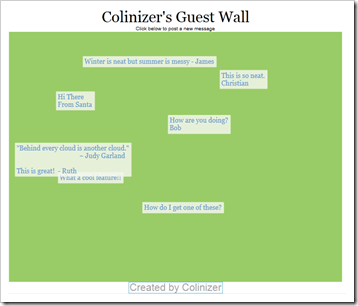
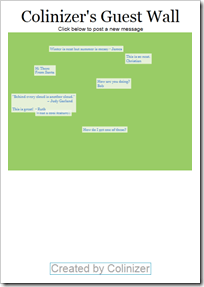
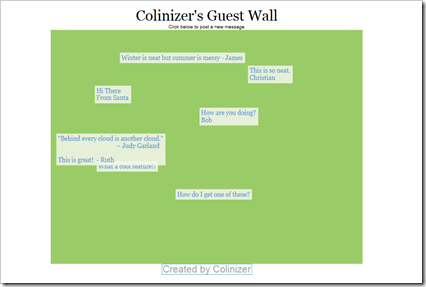
In the following screenshots you’ll notice that the header/footer text stays the same size but the green canvas area scales to fit.  You’ll also notice that it centres horizontally and aligns to the top.

image

image 

image

To achieve this we need to do a few things…

image

In the Silverlight UserControl’s XAML, make sure no Width and Height are set on the UserControl element (note that the d:DesignWidth/Height are there for design-time sizing only).

Note the name of “LayoutRoot” give to the top-most element.


image

Give the canvas a starting size which represents 100%.

Note the name “Wall” given to the canvas we want to scale.

Note the Scale and Translate transforms added to this canvas.


image

In the HTML page, the Silverlight control needs to be sized to 100% of the available width and height (and this needs to suitably apply all the way to the root of the HTML page).  You may do this with CSS styling or some other means.


image

In the Silverlight UserControl’s code-behind find, register for the resize event on the LayoutRoot object (which is a Grid in this case).


image

React to the resizing of the Silverlight control.

This code figures out whether there is more space to scale horizontally or vertically, and applies the lower of the two in both the X and Y direction (preserving aspect ratio) using the named transforms.

The calculations make use of ActualHeight and ActualWidth from the containing space.

The code also horizontally centres the canvas in the containing space.

I say ‘containing space’ in this case, because the Canvas to be scaled is in the middle of 3 rows and the single column in the parent Grid.

For the full code, check out the sample application with the Azure Deployment Guide.

I hope you found this tip useful 🙂 If so, and you’re reading this on January 15th 2010 then please vote for my Mix 2010 conference submissions today! :)  Thank you.

Looking to learn more about the Windows Azure Platform, Silverlight, Windows Touch or Windows Identify Foundation?

If you’d like to see these sessions in person at Microsoft’s Mix 2010 conference or the recordings that will likely be made available for free later on, please vote for the sessions before January 15th 2010, by going to the site, adding the 3 sessions to you ballot and submitting it.

Just 2 days Left to Vote for Mix 2010 sessions on Azure, Silverlight, Windows Touch and WIF

Voting ends on Friday for sessions at Microsoft’s Mix 2010 conference.

I’ve submitted 3 session proposals – see the details – around Windows Touch, Azure & Silverlight which were all accepted into the voting list.  My session on Windows Identity Foundation has already been scheduled for the renowned high-level DevTeach 2010 conference at Microsoft’s Canadian HQ this March.

If you’d like to see my sessions in person at Mix or the recordings that will likely be made available for free then please vote for them.

You can find a list of all sessions available for voting  (a list that periodically shuffles its order), or go directly to my sessions here.  You can pick a total of 5 sessions to vote for.

Quick Tip for Hosting Services for Silverlight on Windows Azure

The Silverlight and Azure Tools for Visual Studio 2008 SP1 both provide convenient means to get going with these respective technologies.

Windows Azure is a good place to host services that your Silverlight application may call, as well as the web application that contains the Silverlight application itself.

However, if you’ve tried to get this to work, then you may have encountered as issue.

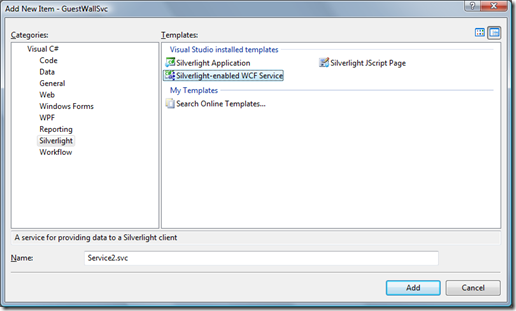
Let’s say you’ve added a Web Role to your Azure application to host the Silverlight application, and you want to add a Silverlight-enabled WCF Service to the website.  You may have tried using the Add New Item dialog to select the “Silverlight-enabled WCF Service” like this…

image

Unfortunately (for reasons I may go into in the future), the Azure platform isn’t going to correctly publish this WCF service in the web role, and your Silverlight app may be able to talk to the service just fine in your development environment, but not when you deploy to Azure proper.

The easiest workaround for this is to create a WCF Role, instead of a Web Role and then add your website files and Silverlight application to that.  The WCF Role exposes a service that is compatible with Silverlight on Azure.

If you check out my Guest Wall application (including source code), you’ll see this in action as well as the code :).

Looking to learn more about the Windows Azure Platform, Silverlight, Windows Touch or Windows Identify Foundation?

If you’d like to see these sessions in person at Microsoft’s Mix 2010 conference or the recordings that will likely be made available for free later on, please vote for the sessions before January 15th 2010, by going to the site, adding the 3 sessions to you ballot and submitting it

My Sessions at Mix 2010 on Azure, Silverlight, Touch and Windows Identity Foundation

I’ve submitted 3 session proposals for Microsoft’s Mix 2010 Conference in March 2010.

If you’d like to see these sessions in person or the recordings that will likely be made available for free, please vote for these sessions before January 15th 2010, by going to the site and submitting my 3 sessions in your ballot.  Please also get help from anyone else you know :).  Thanks!

Here’s information on the 3 sessions I proposed. 

Session Title

Everything You Touch Turns to Azure (aka the Azure-Touch)

Session Abstract

Feel the rush of power as you learn how to wave your hands and connect directly to your throne in the heavens – OK well you may have to settle for learning about Windows Touch in WPF/Silverlight and the Windows Azure Platform.  This is the future – make sure that everything you touch can turn to Azure.

Session Notes/Outcomes

The session shows how the building blocks of Windows Touch, WPF/Silverlight applications and the Windows Azure Platform can be brought together to create a small yet engaging end-to-end experience.  Attendees should gain insight into the benefits and design of Touch-aware applications on Windows 7 as well as the benefits of backing user experiences with the Windows Azure Platform.


Session Title

Get a WIF of this

Session Abstract

Writing services that understand multiple authentication systems is cumbersome and completely yesterday. Claims-based authentication and authorisation is the way to go. We’ll take a dive into how claims work and what Windows Identity Foundation provides by exploring the key components, but more importantly by building our own identify provider, a claims-based service and a Silverlight application that makes use of it.

Session Notes/Outcomes

WIF recently RTM’d but the identify framework it cements is one of the most overlooked components when it comes to Internet-based application design.  Attendees should leave with a sense of how to create WIF components or WIF-aware components, as well as knowledge of the necessary design considerations.

This session will also be presented at DevTeach 2010 in March at Microsoft Canada’s Head Quarters.


Session Title

The Cloud and the Silver lining

Session Abstract

You need a place to host you Silverlight applications as well as the WCF RIA Services and database that back them.  This session shows you not only that the Windows Azure Platform (featuring Windows Azure, SQL Azure and other services), is a great place to put them, but also how to create the connections between the pieces.

Session Notes/Outcomes

This session digs into the mechanics of a real-world application using Silverlight and the Windows Azure Platform.  Attendees should leave knowing how to easily test against and deploy to the Azure Platform, as well as how communication takes place between the component layers. 

Thanks for your support :).

2010 New-Year Prediction: Silverlight + Azure = The New Windows

It has probably not escaped many of you that Windows’ market share (and that of related editions) is being eroded and is potentially under threat to varying extents in some markets as we role into 2010. 

  • iPhone is whipping ‘Windows phones’ such that Windows Mobile 7 will likely be a do or die mission in in 2010 (or more realistically 2011)
  • Android is nibbling at Windows phones too
  • Zune is nowhere near iPhone
  • Netbooks with non-Windows OS installs are creeping into the remaining markets
  • Mac is constantly barking its commercials
  • LAMP is still thriving
  • Google is trying to satisfy basic user requirements will a wafer-thin OS or by being OS-independent

I think however, that Microsoft has the opportunity to really drive adoption of Windows, but not in the way it has before.  The real opportunity for Windows’ continued prosperity lies in the cloud.  Even though this may happen, I do not however think it will be seen as a success – at least not initially (and doomsayers for Windows will jump on this).  The resulting public attitude will probably really grate at Microsoft for some time.

The money may continue to stream in because Microsoft has (or is now planning) a story whereby more people can begin to use, or will continue to use Windows but it would be more so Windows Azure (not the client OS) and they will not be paying for it directly.  The indirect payment may lead to less consumer-based visibility, which may create a negative trend in public opinion (which is what matters in today’s Internet-temperature-measured society).  Few people care how their cool app works.  Azure may be a great back-end for a web-based iPhone app, but it would probably be seen as a point for iPhone/Apple, not Windows/Microsoft.

Microsoft has a ‘Good, Better, Best’ mantra for client richness, but it has previously focused its attention on the ‘Best’, aka Windows ‘proper’.

An application with a Windows 7 client and a Windows Server + Windows SQL Server back (and other servers), and perhaps Office apps as optional clients, is the ideal for Microsoft revenues, but Microsoft is starting to see that serving the ‘Better’ experience is necessary and potentially even more profitable if they can’t get you to effectively subscribe to a ‘Windows’ license by helping to make sure your application/service provider uses Azure.  These providers are paying the real fees to Microsoft while collecting their own revenue stream from users through fees and/or ad-supported revenues.

Silverlight equates to a compact yet rich UI experience that will broaden in future versions and is, or will be, available on many platforms, serving as a great gateway to the Windows Azure Platform.  WPF applications on Windows available via ClickOnce installations (or as XAPs via IE/Firefox) also represent revenue suckers on the tentacles to Azure.    Ray Ozzie flat-out said at PDC09 that Internet Explorer 9 and Silverlight (preferably on Windows 7 of course) are the future for all 3 screens.  That of course leaves IE9 on Windows (or the lesser IE versions on other Windows platforms) or other browsers as the ‘Good’ option which again can also be services on the back-end by Windows Server or Windows Azure.

Microsoft has of course already been collecting service-provider style licensing fees via its SPLA program.  My company has been a licensee for some time in fact.  A cohesive and (almost, but not quite yet) affordable cloud offering for small ISVs opens up the flood gates to licensing Windows (in it’s Azure form, along with SQL Azure) to many more end users who can be consuming ‘Windows’ on any platform, even a Google Chrome browser.

To make this work, Microsoft really needs to up its game for developers in terms of tools and offerings…

It doesn’t help that Silverlight tool support in Visual Studio has been non-existent; forget Expression Blend that developers haven’t had the time or perhaps money to conquer.  WPF applications have also been few and far between; likely for similar tool-support reasons.

Visual Studio 2010 may be just in time, and Microsoft is clearly taking no chances, having recently announced a delay to the RTM in order to improve performance.  This is the first version of the IDE using WPF and Microsoft can’t have poor IDE performance be the reason that developers shun VS2010 en mass.  Adoption of 2010 is crucial because Microsoft has invested energy into integrating tools for their new technologies/platforms and making them easier to target (e.g. SharePoint 2010 and Azure).  The announced delay seems like the smartest move to me.

The included Azure consumption units being added to MSDN Subscription are a tiny and insufficient token.  The initial offering for the highest level subscribers covers one Windows Azure server for 8 months and then goes down.  This simply isn’t high enough to encourage people to get something off the ground.

Microsoft needs to do well with Windows Mobile 7.  This is rumoured to have a Silverlight-based interface which would be more of a plus if the tools had matured already.  If Microsoft could get all the Internet-connected apps for WM7 to be hosted on Azure, maybe they could give away the WM7 license?  You currently need a non-free Visual Studio edition for client-based Windows Mobile development.  Perhaps adding a free Visual Mobile 2010 Express Edition would help push things along?

So the more precise prediction is that Silverlight+Azure = Windows in terms of revenue to many more end-users (who may not be on Windows or have no prior computer), as well as potentially preventing loss of net revenues if people move off the Windows Client.  It may be hard to measure initially like Obama ‘creating or saving’ x million jobs.  It may not happen in 2010, but the seeds must be sewn in 2010.  The real key advocates for this maneuver are the ISVs and service providers and its (and the predictions) success or failure will ride on motivated these parties are to go down this route as well as how easily they can execute it.  Microsoft has to do more to provide solid timely tools, communicate the benefits, educate developers and provide substantial/usable offers for Azure adoption.  Microsoft has not announced a PDC 2010 which means it falls to Mix (not clearly a transition-to-cloud conference) and TechEd conferences (often seen as more IT Pro than developer), regional evangelism, local evangelism and blogs 😉 to help them along…


Silverlight 4 Sample Source Code from PDC 2009 Now Available

Head over to the blog of Microsoft’s Corp VP Scott Guthrie for the details on getting the source code for the demos he used in his PDC 2009 Day 2 Keynote.

These demos include local webcam still and recording capture with effects, a barcode reading demo, rich text support and the ever popular jigsaw puzzle brush demo but this time with a live embedded web page that can even contain a live flash movie!

A notable omission is the code for the Facebook integrated app.  That demo showed an application that ‘picked up’ picture files from a memory card storing pictures of the PDC audience just takes with a camera.  I couldn’t find the help resources for this kind of ‘device access’ feature that was announced.  I’m thinking that perhaps this feature was not included in the publically downloadable beta.  Scott did say that the Facebook app sample would ship later, but I guess not just yet.

Deploy This Silverlight Application on Windows Azure in 10 minutes – no Tools Required!

This post guides you through the process of deploying and configuring the provided Silverlight application on Windows Azure through the Windows Azure Platform web portal using just your compatible web browser.  You do not need any development tools…

The included Guest Wall application is a Silverlight app hosted in a ASP.NET website that runs on Windows Azure Hosted Services and uses the Windows Azure Cloud Storage to store messages that anyone can post.  You can configure it to some extent as explained below.

image

Continue reading