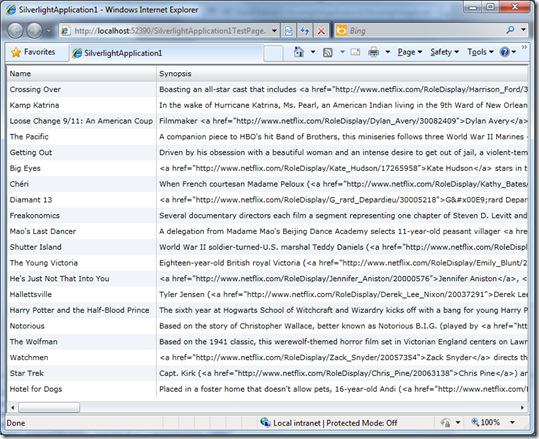
Quick Tip: Add OData to your Windows Phone 7 CTP Silverlight Application in VS2010 RC

So you downloaded the cool new tools for Windows Phone 7 Development and you want to connect to one of those amazing OData feeds… (okay probably just the NetFlix one right now), but perhaps you’ve hit a snag or need a little help getting started..

First point:

You need OData client support, so:

  • Download the OData client for WP7
  • Run the downloaded file to extract a copy of System.Data.Services.Client.
  • Add a reference to the DLL to your project.
  • Add an imports/using state for System.Data.Services.Client.

Second point:

If you are still using the VS2010 RC (which you probably are as of today, as the current WP7 phone CTP is not compatible with the new VS2010 RTM), then you may have had a problem with “Add Service Reference”, specifically that it’s not appearing…

From the release notes:

The Add Service Reference option is not supported in the Windows Phone add-in to Visual Studio 2010. Workaround: Use Visual Studio 2010 Express for Windows Phone to add service references

So you can open up your project with VS 2010 Express for WP, which should also be on your machine.  However, if you have a solution with other projects, they may not be supported in the Express SKU… life is getting complicated.

So, you can easily add the reference manually:

  • Open the VS2010 command prompt from the Start menu.
  • CD to your project directory
  • Issue a command similar to: datasvcutil /uri:http://odata.netflix.com/Catalog/ /dataservicecollection /language:CSharp /Version:2.0 /out:NetFlixRef.cs
  • Use Add Existing Item to add in the the proxy class (in this case NetFlixRef.cs). 
  • You then add an imports/using statement for the namespace in the class and off you go…
  • Add code similar to this to get started on the binding…

var Container = new SomeContainer(new Uri("http://odata.netflix.com/Catalog/", UriKind.Absolute));

var query = linq query on SomeContainer.SomeEntitySet;

var collection = new DataServiceCollection<SomeProxyEntity>();

someListBox.ItemsSource = collection;

collection.LoadAsync(query);

  • … and then bind away in your XAML.

Quick Tip: Setting up OData Support In Silverlight 3

So the shiny new Visual Studio 2010 released yesterday and the final Silverlight 4 releases in 2 days.

What if you are still using Visual Studio 2008 and Silverlight 3 and you want to consume  all the latest OData goodness?

Background on OData

You know what OData is right?

Well first there was ADO.NET Data Services which provides production and consumption of data via a RESTful architecture using HTTP verbs to perform CRUD-like operations.  Client ‘consumer’ and server ‘producer’ classes where included in .NET 3.5 SP1 and client classes where included in Silverlight 3, under System.Data.Services.Client in both cases.

OData at http://odata.org is the evolution of that in the form of a full-on open protocol standard that Microsoft has ‘put out there’ for querying and updating data based on extensions to AtomPub.  Products such as SQL Azure, SharePoint 2010, SQL Server 2008 R2 Reporting Services and Windows Azure Table Storage will expose OData-accessible data and there a growing number of SDKs available on both ends of the communication channel.

For .NET 4.0, ADO.NET Data Services evolves into WCF Data Services (built on WCF) and the associated classes support the OData protocol.  Silverlight 4 will also have WCF Data Services supporting OData.

For .NET 3.5 SP1, the Data Services Update for .NET 3.5 SP1 was made available as a full release.  For Silverlight 3, only a CTP release is available – the ADO.NET Data Services for Silverlight 3 Update CTP3 (eat your heart out long-name marketing folks).

I installed VS2010 yesterday which installed the SL3 toolset (given that SL4 tools don’t come until this Thursday).  I thought it would be good to explain a few things for people that are still using Silverlight 3.

To do anything, you need some OData-accessible data.  Right now, you can go to the Netflix public catalog at http://odata.netflix.com/catalog and just start exploring the data by tinkering with the URL, following the examples at http://www.odata.org/developers/protocols/uri-conventions

OData repositories appear to have a version of 2 and cannot be accessed properly from “V1” ADO.NET Services Clients – you need the WCF Services (OData-compatible) client.

Getting OData Client support in your Silverlight 3 application in VS2008

So for those using Silverlight 3 in VS2008 you can give OData a fairly solid go by downloading that CTP.

To use the update OData friendly libraries, you need to:

  • Extract the System.Data.Services.Client.dll file to somewhere you remember.
  • Add System.Data.Services.Client as a normal reference to your application.
  • Go to the project properties, select the References tab, go into Reference Paths, add the directory that you put your extracted class in to.  As you come out of there, you should see your new path listed for System.Data.Services.Client.

You can now write OData-friendly client code for Silverlight 3 in VS 2008.

Using DataServiceCollection

One of the great new classes is DataServiceCollection.  It enables fully bound updateable observable collection behaviour so you can bind something like a DataGrid to an OData service (with it’s CRUD-like operations).  Think about that 🙂

Using DataServiceCollection requires that the objects you pass in, support INotifyPropertyChanged interface. 

In a Silverilght 3 app in VS2008 (and even VS2010), the Add Service Reference tool (which apparently runs DataSvcUtil.exe from the V3 framework) does not support adding this when it creates the service client proxy.

The .NET 4 version of this tool does do this work for you, so you may want to installed the 4.0 framework and use it like this to get fully-functional binding classes you can use with DataServiceCollection.

%windir%\Microsoft.NET\Framework\v4.0.30319\DataSvcUtil.exe /dataservicecollection /version:2.0 /language:CSharp /out:myproxyclass.vb /uri:http://odata
.netflix.com/catalog

Voila…

 odata in silverlight 3

Silverlight 4 Final Release on 15th 2010

Today, during the Day 2 Keynote of the DevConnections event in Las Vegas, Microsoft announced that Silverlight 4’s final release will be on April 15th this week and available to download.

I think many people were hoping for a release today, but oh well…

Today’s live streamed keynote included demonstrations of Silverlight 4’s features and associated productivity enhancements in Visual Studio 2010.

Note that there will also be an ‘RC’ Tools release for Visual Studio and an Expression Blend 4 Preview update.

quick Review of Mix10 Day 1 Keynote

Due to flight delays I didn’t make it for the Day 1 keynote, so I couldn’t live blog it.  I will post more on the keynote contents later.  Overall, there were NO surprises (and sadly no phone hardware).  A Silverlight 4 RC was released along with development tools for Windows Phone 7 Series.  Installing the Windows Phone 7 tools (was straightforward, though the lack of a standalone installer is a little inconvenient).

The Microsoft wifi at the event is great considering the sea of laptops here.

I’ll be live tweeting (@colinizer) for Day 2.

Today’s keynote is likely going to be about IE9 and design – not as exciting as yesterday.

I’m Going to Mix10

A last minute decision…

I won’t be live blogging but may be live tweeting – @colinizer.  I’ll blog later in the evening.

I’ve been getting in the conference spirit recently (DevTeach, code camps, etc.), and I can work around the conference hours so… why not…  mixmas only comes once a year :-).

If anyone wants to meet up – DM me on twitter or email me if you know how ;-).

On-ramp Ahead to the Windows Phone 7 Series Game and Application Development

So you want to get in the game, or even make the games?

Here’s a summary of what’s been announced and the impending activities which will come to a head (for the first phase at least) with major revelation sessions at Microsoft’s Mix10 conference starting March 15th 2010.

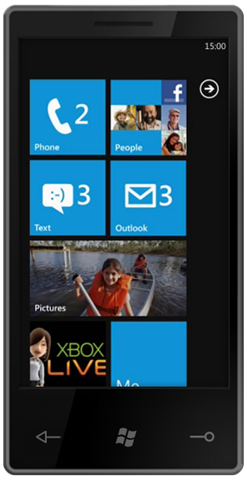
Microsoft came out of the gate about Windows Phone 7 Series (or WP7 for short) at MWC, for the first time publically showing off the new UI.

Since then Microsoft’s Joe gave a more intimate demo on Microsoft’s Channel9.

Charlie Kindel (a man leading the charge at Microsoft) has indicated that .NET, Silverlight & XNA are key technologies to WP7 development.  I’ve long been aware of the Silverlight angle on mobile device and had some preview access to mobile possibilities, so I can see that this is a great direction.  I hope Microsoft brings out the right caliber (and readiness) of tools that developers need – developer tools (and I don’t mean Blend) have been sorely lacking for Silverlight; it will be April 12th before the first of developer design tools for Silverlight are made available with Visual Studio 2010.

There’s been a video of the Platformer game running on Windows Phone 7, with the notion that someone can create a game with largely shared code which can run on Windows 7, WP7, Xbox & Zune.

At the Game Developer Conference this coming week, Microsoft may well be talking about XNA developer for WP7.

Microsoft has just announced the abstracts for the WP7-related sessions at Mix10 (starting the following week) and  Microsoft Canada’s Joey deVilla has a great summary of them.

It has been indicated that access to the keynote and sessions for Mix10 to not require attendance at Mix.

I’m aiming to live blog the MIX keynotes and follow up on what’s announced about WP7 from the sessions.

Be sure to follow the tweets and blog posts of these guys at Microsoft:

Andre Vrignaud: www.ozymandias.com / @ozymandias

Christian Schormann: electricbeach.org / @cschormann

Shawn Hargreaves: blogs.msdn.com/shawnhar / @shawnhargreaves

Todd Brix: windowsteamblog.com/blogs/windowsphone  / @toddbrix

Anand Iyer: www.artificialignorance.net/blog / @ai

Michael Klucher: klucher.com / @mklucher

In Canada keep an eye out here and on the Canadian Developer Connection blog.

Strike I for Microsoft-Developer Relations on Windows Phone 7 Series

I want a Windows Phone 7 Series OS Mobile Phone 7 Phone Windows phone thingy…

I’ll also be lined up to develop application for it too.

However, from the Mix10 blog for the Mix10 event where the development story is scheduled to be officially unveiled (with my highlighting):

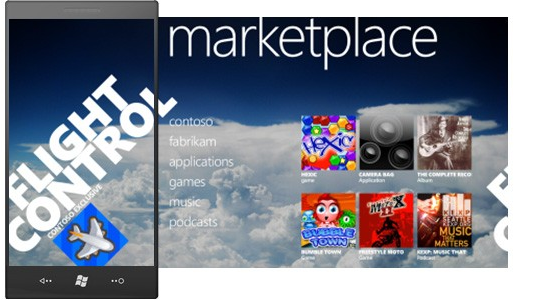
Join us at MIX10 and be among the first to learn how to build applications and games for Windows Phone 7 Series. We’ll introduce you to the development platform, show you how to work with the Windows Phone 7 Series development tools, and give you a tour of the Windows Phone Marketplace. All MIX10 attendees will receive access to the Windows Phone 7 Series development tools and have access to a dedicated track on the Windows Phone 7 Series platform that runs throughout the event.
MIX10 attendees will get exclusive free developer support for the Windows Phone 7 Series development tools. Don’t miss this unique opportunity to be among the first to learn about Windows Phone 7 Series.

The first highlight shows a lose-lose statement.

Either:

Microsoft risks shunning the hordes of non-Mix-attendees (who didn’t go for many potentially important reasons), by delaying their access to the tools.

or

Microsoft risks shunning the Mix-attendees because everyone else will undoubtedly get the tools very quickly (if not immediately) if Microsoft is serious about gaining developer support in a short time.


So it really seems like an attempt to get Mix attendance up.  Given that the discount deadline has been extended many times, it seems that getting people to these events is increasingly difficult.

Microsoft has streamed the PDC and Mix keynotes for the last 3 or 4 events now and made session videos available in about 48 hours.  Unless this is about to change, the real benefit of going to these events is business networking.  I’d like Microsoft to publish the keynote and session access numbers.

I’ll be watching and blogging the keynote(s) live.  I’d love to go, but my priorities don’t lead me there this year. 

Update: I’m going!  I’m gonna squeeze it in – so may live tweet and blog later.

The second highlighted statement (about support) is fair enough, but again, if Microsoft is serious about getting developer output in less than 6 months, it will need to offer up something – I’d suggest additional mobile-specific support incidents for MSDN subscribers.

As I mentioned in January, I’m also expecting to see a free ‘Microsoft Visual Phone Developer 2010 Express Edition’, if Microsoft really wants to give this the ground swell it needs for a proper launch.

Quick Tip for Uploading Zip Files as Multiple Files to SharePoint server 2007 or WSS 3.0 from Vista

SharePoint allows suitably configured users to upload multiple files to document librations from the Upload menu item.

Unfortunately, on Windows Vista machines, any .ZIP files will not be shown for selection.

This relates to Vista’s ability to consider .ZIP files as folders into which a user can navigate within Windows Explorer.  This means that they don’t appear with the file list for the multiple upload.

There are some registry-change methods available to work around this but I find the quickest solution to be this:

  • Rename any .ZIP file to another extension prior to upload, e.g. .ZIP2
  • Select and upload the file in the multiple file upload selection
  • Use the Open with Windows Explorer option under the Document Library’s Action menu to browse to the uploaded file on SharePoint and rename it back to .ZIP.

This may not sound like a great solution and you may wonder why one would bother, especially for a single file.  Using the Multiple File method, allows the user to see a progress bar for the upload.  Additionally, the single file upload method may time out with a large single .ZIP file.

Not ideal, but it gets the job done!