Silverlight From The Client to the Cloud: Part 3 – 3D UI Context

In this series blog entry I’ll explain how one can use perspective 3D in Silverlight 3+ to create interesting UI transitions as shown in the following screenshot sequence from part of a sample application I created that was demonstrated across Canada in Microsoft’s EnergizeIT tour.

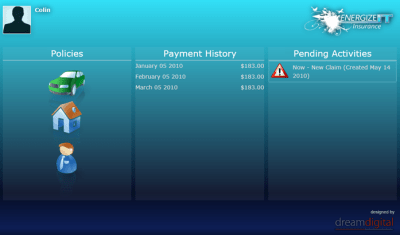
Initial state prior to 3D animation…

20100514 home

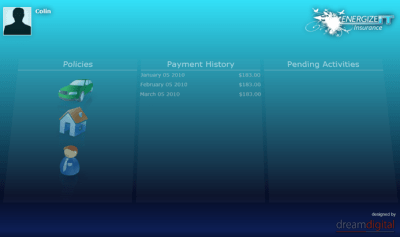
the central UIElement is leant back and faded out in a short animation…

20100514 fade back

New UI is shown on top… using the energy reveal shown in Part 2 of this series….

20100514 claim

… and once this UI is removed, the UI behind is faded back in and pulled back up to its start position.


To do this means declaring a Projection property element on the component…

image

Property elements in XAML provide a means to declare a property that take an object rather than a simple value.  It would be difficult or clumsy to try to declare all the properties of an object (and even any sub objects) in a single attribute value.

We then need a storyboard to animate the X rotation of the projection on the UI element and the opacity of the UI element.

image

This has given you one possible use for the 3D projection addition in Silverlight 3.  Retaining elements of you UI on screen (but put ‘aside’ or back in this case) can help the user to easily keep track of their current context or position in the flow of the application UI navigation.

Silverlight From the Client To The Cloud: Part 2 – Clip Reveal Animation

In this series blog entry I’ll explain how I did the ‘electric energy’ reveal shown in the following screenshot sequence as demonstrated across Canada in Microsoft’s EnergizeIT tour.


20100514 reveal 1

20100514 reveal 2

20100514 reveal 3

20100514 reveal 4

A key feature of this reveal animation is that the underlying UI appears to be ‘generated’ or ‘materialised’ by the ‘energy bar’ as it swoops down the page.

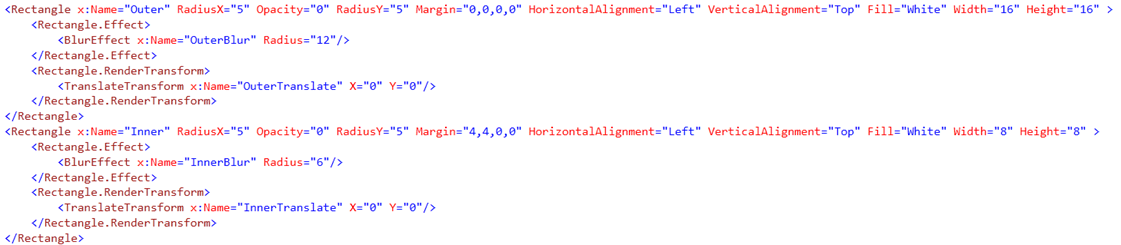
To create the adaptable energy bar, I created a ‘dot’ (that can be stretched into a line) of energy ‘glow’ using two rounded-corner rectangles – one inside the other – with blur effects…

image

A ‘reveal’ storyboard sequence ‘framework’ was created to reveal the dot (set to fully transparent initially above), stretch it horizontally, move it down, shrink it back to a dot and fade it out.  It’s a framework because I designed the overall animation so that it could be applied to any UIElement – generally a user control.

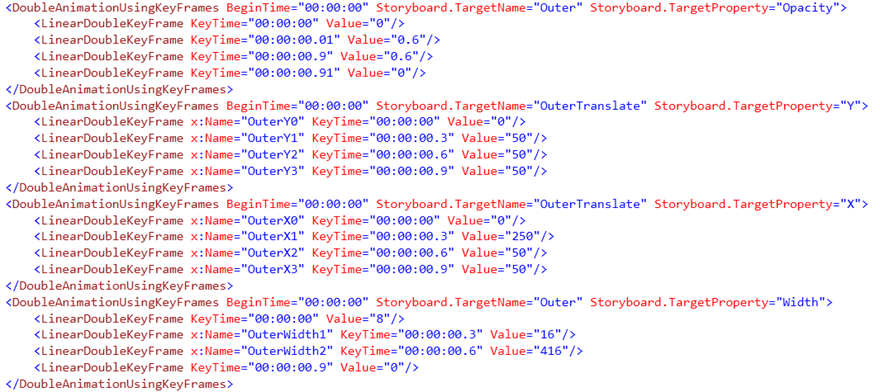
Here are the storyboard elements in the ‘reveal’ storyboard for outer ‘ring’ of energy.  A similar set is used for the inner ‘ring’.

image

In order to make the energy bar appear to ‘generate’ or ‘materialise’ the controls beneath, a clipping rectangle will be applied to the UIElement being revealed.  Then, the other key storyboard element needed is something to animate the Y element of a TranslateTransform that is applied to the clipping rectangle…

image

The TargetName of this storyboard element will need to be set as appropriate. I created a function called EnergyReveal taking a UIElement argument, to do this and other necessary tasks.

A few of the key steps in this function are:

  • Make the target UIElement visible and call UpdateLayout() on it, to make sure the width and height of it are known.
  • Create a rectangle big enough to cover the target UIElement – this will be the clipping rectangle.
  • Assign the rectangle as the clipping region for the target UIElement.
  • Creation an new TranslateTransform and assign it to the the clipping rectangle.
  • Set the TranslateTransform as the target of the TranslateAnim storyboard element above.
  • Calculate the initial X and Y values for the position at the top-middle of the UIElement where the energy dot will appear and grow from.
  • Position the outer/inner elements of the energy dot and set values on the storyboard framework to match the size of the UIElement so the energy bar trajectory matches the edges of the target UIElement.
  • Start the reveal storyboard.

It’s possible to mix and match the location of the ‘framework’ components between XAML and code.  This is just the way it evolved in this case.

A similar EnergyHide() function sets things up for the energy bar to swoop down the screen again, but with the clip going downwards so that the target UIElement appears to be ‘dissolved’ from the top down.

I’ll leave it as an exercise to the reader to reconstruct such a framework to their liking, but hopefully this has given you an idea of the kind of interesting reveal transition you can create in Silverlight.

Navigating Bus Stops with Open Data and Windows Phone 7

In a recent post I talked about Bringing Azure+OData+Silverlight Goodness to Open Data Apps in Ottawa.  To do this, I imported standardized transportation data (that I found for the city of Ottawa) into a SQL database and exposed it as OData using WCF Data Services on an Entity Framework model.  I subsequently published a sample database to Windows Azure to demonstrate use of the data in an adapted Silverlight application that uses the Open Data Application Framework.

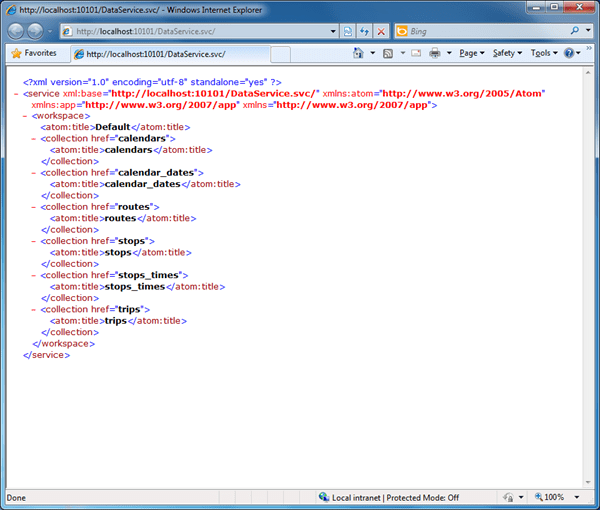
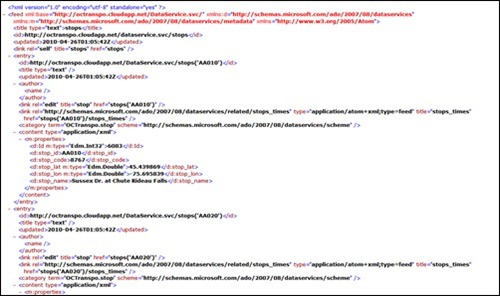
The OData information is accessible through a RESTful interface.  Here are the root entities displayed in IE.

20100606 odata

Last Thursday evening, I did a presentation on building Silverlight applications for Windows Phone 7.  Given that there’s an OData client library CTP available for Windows Phone 7, I knocked up a Bus Stop ulity application to demonstrate to my audience.  To get started with Silverlight applications on WP7 you can download the free developer tools (vs. the designer tools which are extensions for Blend 4 RC currently) currently the April CTP version.  The developer tools also include the XNA Game Studio for creating XNA-based games.

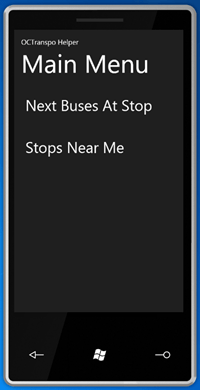
Here’s are the two main features I set up…

20100606 menu

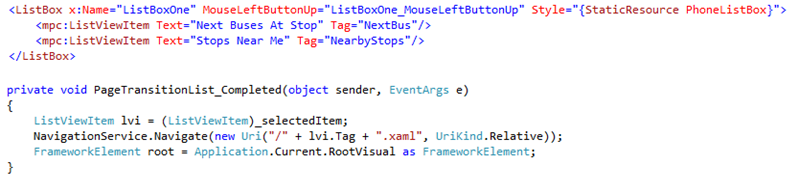
Do create my menu I went with the list-based project template and then replaced the listbox content with manual entries with tag values.  These tags are then used as the names of the XAML files to load.  Quick and dirty, but it works…

20100606 listcode

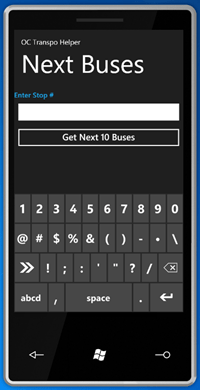
Selecting the first option brings up a screen that allows the user to enter a bus stop (by its number as displayed on bus stop signs in Ottawa) and then lookup the trip heading and time of the the next 10 buses stopping at that stop.

When declaring the text box to enter the number, the attribute settings InputScope="Number" is used to default the standard input panel to the number entry mode.  The "TelephoneNumber" value may have also been acceptable (to bring up the phone keypad keyboard with bigger numbers) since many people request this kind of information using their telephone and its keypad.

20100606 entry

The application then uses a proxy class derived from DataServiceContext (and created using the DataSvcUtil command line tool since the WP7 add-in for VS2010 Pro does not currently provide an Add Service Reference option on a project) to query the OData service (running locally or on Azure).

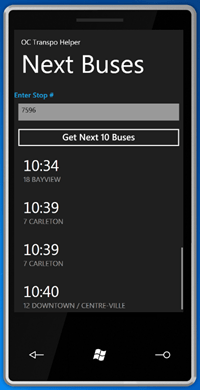
The results come back and use the very flexible ListViewItem control (with its Metro styling) to display the results, making use of Layout="TextAndDetails".

20100606 times

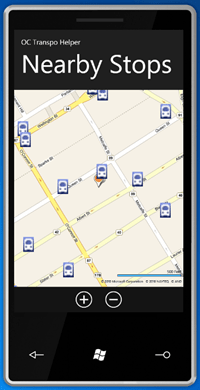
If the user had gone to the other main menu option, they’d be presented with this screen.

20100606 nearby

This shows their ‘current’ location and the bus stops nearby.  Again this calls the OData service using filter parameters to bring back only bus stops that are within a 1km block of the location.  The map shown is the Bing Maps Silverlight control set to Road mode – the same one as used for desktop Silverlight apps – and the bus stop icons are added as children to the map control with attached properties specifying their locations.  The navigation controls where turned off to maximise space, so I added two Windows Phone 7 Applicaiton Bar to allow the user to zoom in and out.  The user can pan around with their finger of course.  The bus stop icons could easily be made actionable in some way. 

Since the WP7 emulator has no GPS, the location was hard coded in.  One of the samples in the WP7 SDK shows how to use Reactive Extensions to simulate location information in a way that is easily switched later to real device data. 

While this kind of application needs fairly accurate location data, others don’t.  Perhaps just knowing the city would be enough if one had just landed in that city and wanted general information.  The location APIs for WP7 allow the developer to easily make a choice between slow and accurate (while the device GPS locks on to satellites) or quick and less accurate (by using available Wifi and mobile network information in conjunction with Microsoft’s cloud-based location services).

Once WP7 devices are released, and the city officially publishes this data set I’d expect a fleshed out and polished application of this kind to be quickly available ;-).

Silverlight from the Client to the Cloud: Part 1

This post is part 1 in one of several series.  The series gives you a glimpse into some of the experiences and capabilities available with Silverlight and gives pointers on how to get started with them.

From March 30th to April 22nd this year, the Developer & Platform Evangelism Team at Microsoft Canada delivered a combination of all-day From Client to the the Cloud tour  and evening Community Connection Series events in 19+ cities across Canada as part of EnergizeIT 2010.

The EnergizeIT events give an idea of what’s possible.  To compliment those events, the TechDays events by Microsoft Canada coming up again this year in the Autumn season, give attendees the opportunity to learn more about how they can use Microsoft products and technologies.  I’ll be speaking there again this year on topics that may include Silverlight, Azure, OData and Windows Phone 7. 

At each of the recent EnergizeIT events, a 2.5 hour demo showed the tip of the iceberg in terms of what’s possible with some of the latest Microsoft tools and technologies from the viewpoint of developers and IT professionals.  They covered technologies and products included .NET 4.0, Visual Studio 2010 (including Lab Manager), Hyper-V, Windows Mobile, Office 2010, SharePoint 2010, PowerShell, System Center, the Windows Azure Platform and Silverlight.

The demo covered the user, developer and IT pro experience for a new car insurance business.  It showed how a consumer could use software on a Windows Mobile device to capture critical information when a collision occurs as well as how they can review and connect with the insurance company back at home.  It continued to show the construction of the application on the backend, how the back office workflow can operate, and how the application can be deployed to the cloud to take advantage of various benefits.

About two months before EnergizeIT, the DPE team contacted me to produce the Silverlight portion of the demo.  I had the pleasure of working closely with Christian Beauclair and Rick Claus to integrate the Silverlight application into the demo experience.

The user experience starts when they use their Windows Mobile device to capture collision incident information and submit a claim to the insurance company which is stored it in a SQL Server database via WCF Web Services and ADO.NET Entity Framework.  You can read about the mobile application portion in Mark Artega’s blog post

The Silverlight experience begins when the user gets home and follows up with the insurance company on their home computer.

First the user logs into the application…
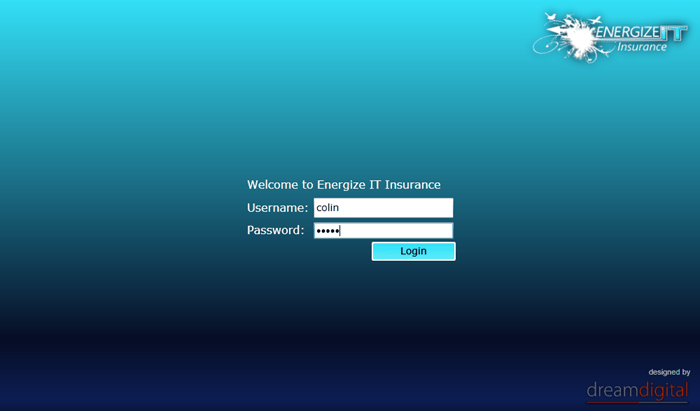
20100514 login 

To reflect the ‘electric energy’ style of the the Energize ‘brand’ and the logo, the UI reveals areas using a specific ‘energy bar’ animation.  This grows from a spot…

20100514 reveal 1

…to the full width of the element to be revealed…

20100514 reveal 2

… and ‘materializes’ the element as the energy bar sweeps down over the area…
20100514 reveal 3

… after which the energy bar then shrinks until it disappears.  We joked about putting a ‘vudgzzz’ sound with this, but the demo didn’t have sound up. 
20100514 reveal 4

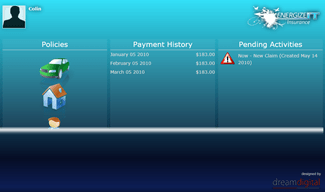
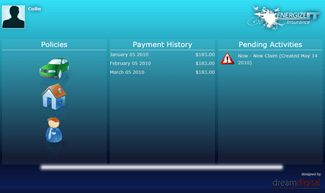
The Silverlight application uses ADO.NET Data Services in Silverlight 3 (now WCF Data Service in Silverlight 4 including OData support), to pull down a series of connected entities including a customer record, policies, claims, related employees, pictures, etc.  You can see how the sections of this application UI could lend themselves to display on Windows Phone 7.  The policy type icons are XAML resources bulit into User Controls, built from vectors allowing for a great scaling experience.  Unfortunately the release of Silverlight 4 was too close to the tour launch for us to use Silverlight 4 features like global implied styling.
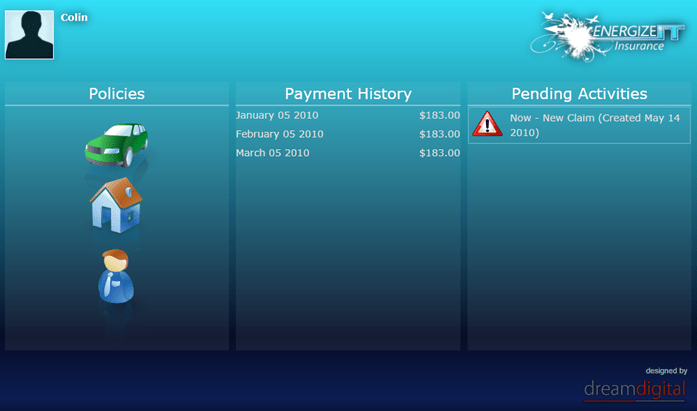
20100514 home

When the user select the Claim activity, an animation storyboard acts on the UI to fade it and tilt it away using the Perspective 3D capabilities in Silverlight 3…
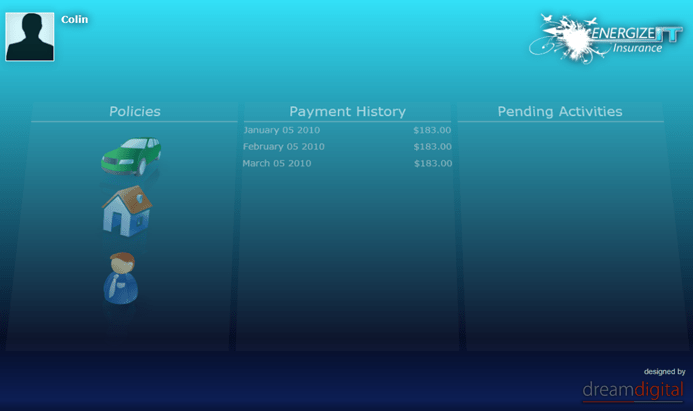
20100514 fade back

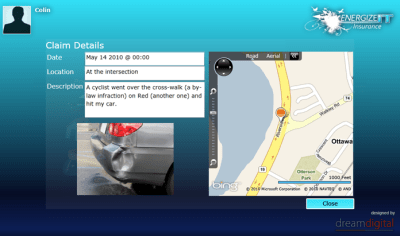
… and the claim details are revealed.  This includes binary image data transfered from the backend database.  The geospatial data in the claim is used with the Bing Maps Silverlight control to show the location of the collision on a map (with full zoom and pan support aloing with road and aerial views).
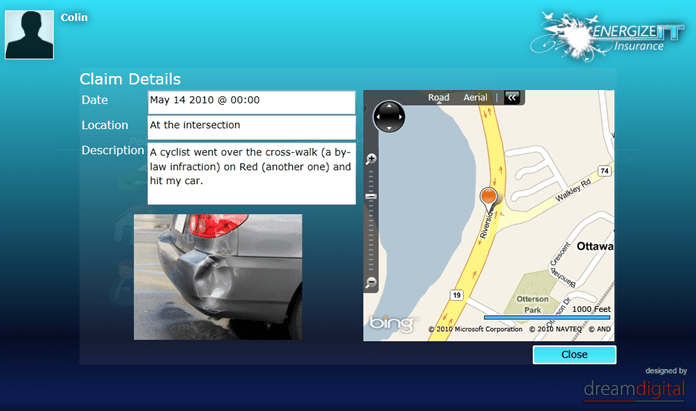
20100514 claim

It would then be possible to store updated information back to the SQL Server database via the WCF Data Service wrapping around the ADO.NET Entity framework model wrapping the database.

The asynchronous nature of all network calling libraries in Silverlight ensures that the user interface does not freeze up when the application is talking to services in the cloud.

The demo goes on to demonstrate a chat session between the user and an insurance adjuster which results in an appointment being placed in the users pending activities list.

This demo application scratches the surface of what’s possible.  Features like mic/webcam capture, WCF RIA Services, Templating, Deep Zoom, DRM, Streaming A/V Support, Printing, Out-of-browser execution, etc. really empower developers to take Silverlight to the max.

In upcoming series posts, I’ll give you pointers on the Silverlight experiences and capabilities of this application and the technologies it uses.
Exploring OData with Silverlight

Silverlight 4 includes native support for accesing OData-compatible data service, but it can be hard to use the entities exposed by such services without being able to explore the data and confirm the range and semantics of the data.

Well, you can use the OData URL query syntax to dive through the XML in your browser (yum!), or you could create an application to more visually show the data. 

Both of those are less than optimal for initial exploration, and why bother, when there’s a tool that lets you start exploring.

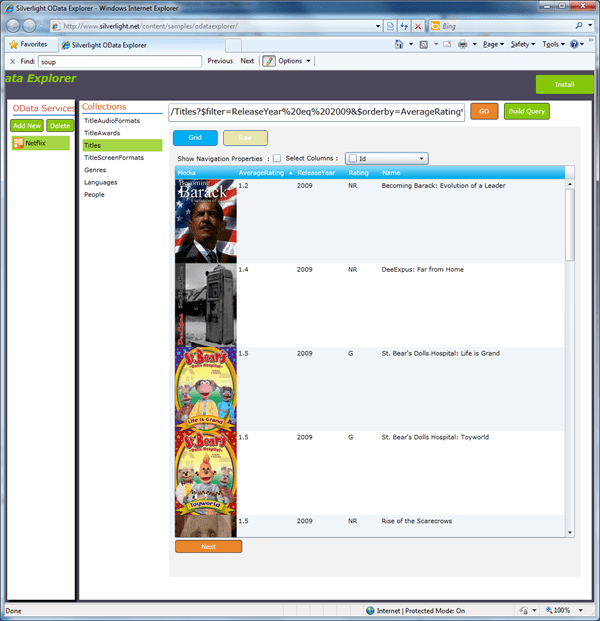
The OData Explorer sample application provides a good way to explore a specific OData-compatible service and also provides a list of some of the public compatible services.

The tool can be found here: http://www.silverlight.net/content/samples/odataexplorer/

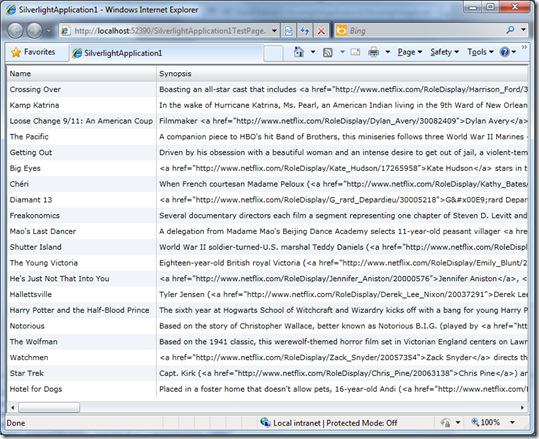
As an example, one can use it to explore the Netflix service at http://odata.netflix.com/Catalog/ and try out a query like this:

/Titles?$filter=ReleaseYear%20eq%202009&$orderby=AverageRating%20asc&$select=AverageRating,ReleaseYear,Rating,Name

This provides the lowest rated NetFlix titles in 2009… hmm… interesting results…

Give it a go 🙂

silveright od x 1

Bringing Azure+OData+Silverlight Goodness to Open Data Apps in Ottawa

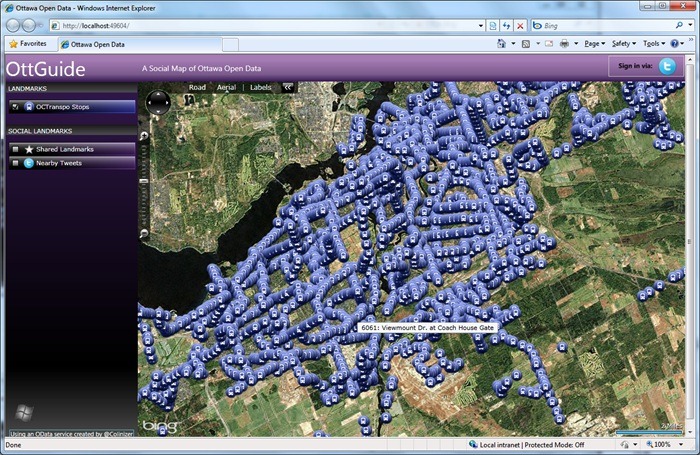
On Saturday April 24th 2010, at Open Data Ottawa Hackfest, a team built the ‘OttGuide’ application (here showing 6000+ bus stops on the Ottawa public bus transit network), built on the Open Data Application Framework using Silverlight and Bing Maps, accessing an OData service built with .NET 3.5 and hosted on Windows Azure and SQL Azure.  For more on open data and cross-platform togetherness, consider for the Make Web Not War conference on May 27th 2010 in Montreal.

odata1

This passed Saturday Apr 24th 2010, the very successful Open Data Ottawa Hackfest took place for the first time in Ottawa City Hall organised by Edward Ocampo-Gooding and friends.  A large number of people (enough to exhaust the free t-shirt supply) attended for 4+ hours from different fields (developers, designers, librarians, statisticians. media and city officials).  The event included opening presentations, a hack fest where attendees worked on applications showing use of Ottawa data and closed with a series of presentations showing the fruits of the attendees’ labour.

Prior to the event, the City of Ottawa (unlike cities like Vancouver and Edmonton) hadn’t officially published municipal data or a data publication policy.  This meant that attendees to the hackfest were using various interesting methods to get data for their application from screen scraping to manual data re-enty.

I had the opportunity to talk at length with the city’s CIO, Guy Michaud, and discovered that the city is in fact on the verge of agreeing a policy and then immediately publishing a few initial sets of satic data, most likely sometime in May.  It’s quite possible that the hackfest event helped push this action ahead, but Guy is clearly a guy with forward-looking ideas on the issue of data publishing.

I was told about the event a few weeks ago by friend and Microsoft Canada IT Pro Advisor Rick Claus who was planning on attending.  So, in those weeks, I took a look at some of the work that has been done to obtain Ottawa municipal data and at open data work in general.  In particular I looked in 3 things:

odata2

  • Craig Davey had done extensive work on taking Google-compatible data published on the City’s OCTranspo site, augmenting it, converting it to GTFS format and publishing it with updates in a feed.
  • I had been familiar for some time with Microsoft’s open protocol for providing access to queryable and updateable data sets in a RESTful way – OData.  I did further research into this.  OData builds on ADO.NET Data Services and is fully incorporated into WCF Data Services within the recently released .NET 4 framework.  OData is designed to be consumed (or produced) by many different clients on many platforms. There are client libraries available or in the works for .NET (3.5 with an update & 4.0), Silverlight 4.0, iPhone, Javascript, Windows Phone 7, PHP & Java.  In fact, any client that can make web requests and handle XML can access OData-based services.

The night before the event, on a total whim, I decided to knock up an OData service exposing OCTranpo data, so I: 

  • started with Craig’s GTFS-format data provided as CSV files in a ZIP file. 
  • created an ADO.NET Entity Framework Model in a new .NET 3.5 Class Library project in Visual Studio 2010 to represent the GTFS data with entities and relationships
  • used the designer tools to generate DDL script to create the database schema
  • generated the schema using the script
  • created a database in my local SQL Server 2008 server
  • wrote code to import the CSVs and use the ADO.NET Entity Framework classes to import the data which was taking 3+ hours
  • wrote new code to import the CSVs with the SQL using bulk copy class bypassing the model which did the import of over 2 million bus stop time rows in a few minutes
  • added a WCF Service project and removed the default service from the project template
  • added a WCF Data Service item, setting it up to use the class of the entity model I created and providing read access to all entities
  • copied the connection string from my entity model class library app.config into the WCF Service web.config
  • tested my OData service using the OData URL query syntax, here showing a list of all stops… but this could be queried to find things like a nearby stop (from GPS coordinates), the bus times for a stop, the trips (e.g. ‘saturday service to ABC on route x’) and routes (i.e. bus number) going through a stop, find the stops on a trip, when a specific service gets somewhere, or even for full journey planning, etc.

odata3

  • re-opened by solution as administrator so I could use the Azure Cloud tools
  • added a Windows Azure cloud project with no roles and added my existing WCF Service project to the roles
  • tested OData access running in the local Azure Development Fabric connecting to my local SQL Server database
  • created a SQL Azure server and database in the cloud using the SQL Azure portal
  • connected to SQL Azure using SQL Server Management Studio and created my database schema using a modified version of my existing DDL script (removing USE statements)
  • used the bcp utility to export tables from my local database to local files and then again to import those up to SQL Azure
  • updated the connection string in my web.config to use the SQL Azure database
  • tested OData access running in the local Azure Development Fabric connecting to the SQL Azure database
  • published by cloud project in Visual Studio, created a Hosted Service on the Windows Azure portal and deployed the application to Azure using the portal
  • tested OData access running in on Windows Azure connecting to the SQL Azure database

So I had an OData service exposing the OCTranspo bus routes, trips, stops and trip stop times – sweet!

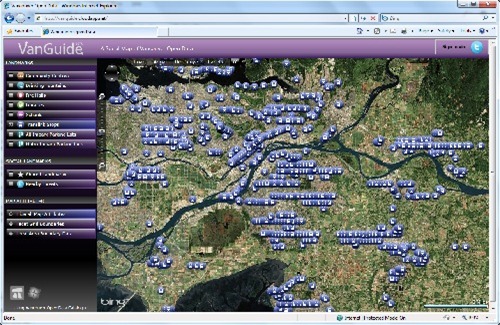
When I got to the event at 3:15pm, I met up with Christian, Rick & John Weigelt (Microsoft Canada’s National Technology Officer).  They were looking at the VanGuide application and potential Ottawa data sources to hook up to it as a demonstration.  Demonstrations were due at 4pm.  Of course, as I’ve stated, good data sources were hard to find because the City of Ottawa hadn’t published any official open data sets.

OData service to the rescue…?

We set to work on integrating my sample OCTranspo OData service (which was already running the cloud), into the the Open Data Application Framework, transforming the VanGuide application into an ‘OttGuide’ application.  The framework includes a Silverlight application project that includes dynamic handling of web-based data sources (the dynamic list of landmark sources on the left of the UI) and asynchronous data retrieval and handling code (that takes KML and other format data and adds data points as map points on a Bing Maps Silverlight control).

We wanted to make this Ottawa specific, wo we went ahead and:

  • modified the data source list to show an entry for OCTranpo and removed the other ones
  • removed other Vancouver-specific map region options
  • added custom code to handle OCTranpo GTFS entities in a feed (our OData feed) using Linq to XML to create Landmark instances that the framework already understands
  • made the application zoom in on Ottawa
  • made some other cosmetic changes for Ottawa

The result is the application you see at the start of this blog entry.  For full disclosure, we got the full bus stop retrieval and map point creation working literally 1 minute after the public presentation section finished, but Christian managed to demonstrate the VanGuide version and the OData feed.

The ODAF framework means that an OttGuide application user can select bus stops, rate them, add comments, etc.  It would be relatively easy to add datasets for other ‘landmarks’ (e.g. water foundations, tourist spots, parks and even pot holes).

The same OData service could be used on clients like the new Windows Phone 7 platform to give bus services users valuable travel information :).  Perhaps more on that later…

Open data and open web technologies are current hot topics and OData is a great protocol to bring things together on many platforms.  Silverlight is a great technology to deliver rich user experiences on many platforms using data sources from a variety of platforms. 

Microsoft and Open Source Communities are sponsoring the Make Web Not War conference on May 27th 2010, showcasing the latest cross-platform techniques and technologies, including presentations, panels, workshops, a codefest, the FTW coding competition and a party!  Open Data, HTML 5, PHP, JQuery, Mobile, SEO and the Cloud, are amongst the topics being covered.  Speakers and panelists attending include myself, Microsoft Canada team members and many open source experts.

Make Web Not War

Quick Tip: Add OData to your Windows Phone 7 CTP Silverlight Application in VS2010 RC

So you downloaded the cool new tools for Windows Phone 7 Development and you want to connect to one of those amazing OData feeds… (okay probably just the NetFlix one right now), but perhaps you’ve hit a snag or need a little help getting started..

First point:

You need OData client support, so:

  • Download the OData client for WP7
  • Run the downloaded file to extract a copy of System.Data.Services.Client.
  • Add a reference to the DLL to your project.
  • Add an imports/using state for System.Data.Services.Client.

Second point:

If you are still using the VS2010 RC (which you probably are as of today, as the current WP7 phone CTP is not compatible with the new VS2010 RTM), then you may have had a problem with “Add Service Reference”, specifically that it’s not appearing…

From the release notes:

The Add Service Reference option is not supported in the Windows Phone add-in to Visual Studio 2010. Workaround: Use Visual Studio 2010 Express for Windows Phone to add service references

So you can open up your project with VS 2010 Express for WP, which should also be on your machine.  However, if you have a solution with other projects, they may not be supported in the Express SKU… life is getting complicated.

So, you can easily add the reference manually:

  • Open the VS2010 command prompt from the Start menu.
  • CD to your project directory
  • Issue a command similar to: datasvcutil /uri:http://odata.netflix.com/Catalog/ /dataservicecollection /language:CSharp /Version:2.0 /out:NetFlixRef.cs
  • Use Add Existing Item to add in the the proxy class (in this case NetFlixRef.cs). 
  • You then add an imports/using statement for the namespace in the class and off you go…
  • Add code similar to this to get started on the binding…

var Container = new SomeContainer(new Uri("http://odata.netflix.com/Catalog/", UriKind.Absolute));

var query = linq query on SomeContainer.SomeEntitySet;

var collection = new DataServiceCollection<SomeProxyEntity>();

someListBox.ItemsSource = collection;

collection.LoadAsync(query);

  • … and then bind away in your XAML.

Quick Tip: Setting up OData Support In Silverlight 3

So the shiny new Visual Studio 2010 released yesterday and the final Silverlight 4 releases in 2 days.

What if you are still using Visual Studio 2008 and Silverlight 3 and you want to consume  all the latest OData goodness?

Background on OData

You know what OData is right?

Well first there was ADO.NET Data Services which provides production and consumption of data via a RESTful architecture using HTTP verbs to perform CRUD-like operations.  Client ‘consumer’ and server ‘producer’ classes where included in .NET 3.5 SP1 and client classes where included in Silverlight 3, under System.Data.Services.Client in both cases.

OData at http://odata.org is the evolution of that in the form of a full-on open protocol standard that Microsoft has ‘put out there’ for querying and updating data based on extensions to AtomPub.  Products such as SQL Azure, SharePoint 2010, SQL Server 2008 R2 Reporting Services and Windows Azure Table Storage will expose OData-accessible data and there a growing number of SDKs available on both ends of the communication channel.

For .NET 4.0, ADO.NET Data Services evolves into WCF Data Services (built on WCF) and the associated classes support the OData protocol.  Silverlight 4 will also have WCF Data Services supporting OData.

For .NET 3.5 SP1, the Data Services Update for .NET 3.5 SP1 was made available as a full release.  For Silverlight 3, only a CTP release is available – the ADO.NET Data Services for Silverlight 3 Update CTP3 (eat your heart out long-name marketing folks).

I installed VS2010 yesterday which installed the SL3 toolset (given that SL4 tools don’t come until this Thursday).  I thought it would be good to explain a few things for people that are still using Silverlight 3.

To do anything, you need some OData-accessible data.  Right now, you can go to the Netflix public catalog at http://odata.netflix.com/catalog and just start exploring the data by tinkering with the URL, following the examples at http://www.odata.org/developers/protocols/uri-conventions

OData repositories appear to have a version of 2 and cannot be accessed properly from “V1” ADO.NET Services Clients – you need the WCF Services (OData-compatible) client.

Getting OData Client support in your Silverlight 3 application in VS2008

So for those using Silverlight 3 in VS2008 you can give OData a fairly solid go by downloading that CTP.

To use the update OData friendly libraries, you need to:

  • Extract the System.Data.Services.Client.dll file to somewhere you remember.
  • Add System.Data.Services.Client as a normal reference to your application.
  • Go to the project properties, select the References tab, go into Reference Paths, add the directory that you put your extracted class in to.  As you come out of there, you should see your new path listed for System.Data.Services.Client.

You can now write OData-friendly client code for Silverlight 3 in VS 2008.

Using DataServiceCollection

One of the great new classes is DataServiceCollection.  It enables fully bound updateable observable collection behaviour so you can bind something like a DataGrid to an OData service (with it’s CRUD-like operations).  Think about that 🙂

Using DataServiceCollection requires that the objects you pass in, support INotifyPropertyChanged interface. 

In a Silverilght 3 app in VS2008 (and even VS2010), the Add Service Reference tool (which apparently runs DataSvcUtil.exe from the V3 framework) does not support adding this when it creates the service client proxy.

The .NET 4 version of this tool does do this work for you, so you may want to installed the 4.0 framework and use it like this to get fully-functional binding classes you can use with DataServiceCollection.

%windir%\Microsoft.NET\Framework\v4.0.30319\DataSvcUtil.exe /dataservicecollection /version:2.0 /language:CSharp /out:myproxyclass.vb /uri:http://odata
.netflix.com/catalog

Voila…

 odata in silverlight 3

Silverlight 4 Final Release on 15th 2010

Today, during the Day 2 Keynote of the DevConnections event in Las Vegas, Microsoft announced that Silverlight 4’s final release will be on April 15th this week and available to download.

I think many people were hoping for a release today, but oh well…

Today’s live streamed keynote included demonstrations of Silverlight 4’s features and associated productivity enhancements in Visual Studio 2010.

Note that there will also be an ‘RC’ Tools release for Visual Studio and an Expression Blend 4 Preview update.

I’m Going to Mix10

A last minute decision…

I won’t be live blogging but may be live tweeting – @colinizer.  I’ll blog later in the evening.

I’ve been getting in the conference spirit recently (DevTeach, code camps, etc.), and I can work around the conference hours so… why not…  mixmas only comes once a year :-).

If anyone wants to meet up – DM me on twitter or email me if you know how ;-).