Quick Tip for Scaling a Silverlight Canvas On Browser Resizing

UPDATE: For the easy route, consider placing your canvas in a ViewBox control which is in the Control Toolkit for Silverlight 3 and is included in the Silverlight 4 runtime.

In December I produced an an easy-to-follow Azure Deployment Guide which has so far been successfully used by hundreds of people to deploy an application to Windows Azure.  It also came with a sample Silverlight application.

That application includes the capability to scale an inner canvas (while maintaining aspect ratio) in response to the outer grid and control being resized as a result of the browser window being resized by the user.

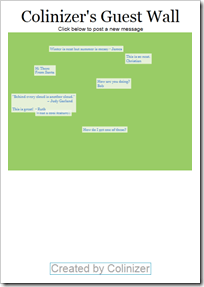
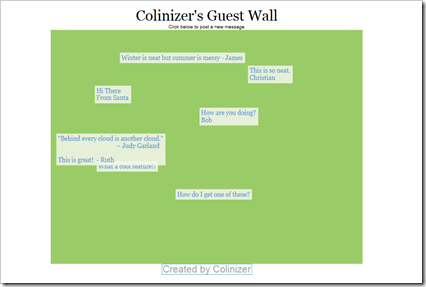
In the following screenshots you’ll notice that the header/footer text stays the same size but the green canvas area scales to fit.  You’ll also notice that it centres horizontally and aligns to the top.
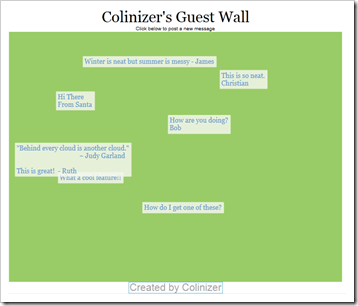
image

image 

image

To achieve this we need to do a few things…

image

In the Silverlight UserControl’s XAML, make sure no Width and Height are set on the UserControl element (note that the d:DesignWidth/Height are there for design-time sizing only).

Note the name of “LayoutRoot” give to the top-most element.

 

image

Give the canvas a starting size which represents 100%.

Note the name “Wall” given to the canvas we want to scale.

Note the Scale and Translate transforms added to this canvas.

 

image

In the HTML page, the Silverlight control needs to be sized to 100% of the available width and height (and this needs to suitably apply all the way to the root of the HTML page).  You may do this with CSS styling or some other means.

 

image

In the Silverlight UserControl’s code-behind find, register for the resize event on the LayoutRoot object (which is a Grid in this case).

 

image

React to the resizing of the Silverlight control.

This code figures out whether there is more space to scale horizontally or vertically, and applies the lower of the two in both the X and Y direction (preserving aspect ratio) using the named transforms.

The calculations make use of ActualHeight and ActualWidth from the containing space.

The code also horizontally centres the canvas in the containing space.

I say ‘containing space’ in this case, because the Canvas to be scaled is in the middle of 3 rows and the single column in the parent Grid.

For the full code, check out the sample application with the Azure Deployment Guide.

I hope you found this tip useful 🙂 If so, and you’re reading this on January 15th 2010 then please vote for my Mix 2010 conference submissions today! :)  Thank you.

Looking to learn more about the Windows Azure Platform, Silverlight, Windows Touch or Windows Identify Foundation?

If you’d like to see these sessions in person at Microsoft’s Mix 2010 conference or the recordings that will likely be made available for free later on, please vote for the sessions before January 15th 2010, by going to the site, adding the 3 sessions to you ballot and submitting it.

Quick Tip for Detecting Azure Environment During Your Development Cycle

Given the Azure tools and portal for Visual Studio 2008, there are 4 likely modes of execution during your development cycle:

  1. Testing in Visual Studio (with no Azure environment)
  2. Testing in Visual Studio using the local Azure Development Fabric/Storage
  3. Staged on the Azure portal
  4. Deployed on the Azure portal

#1 mostly applies when you have an application that you are porting, or you are development components that may become part of the application.

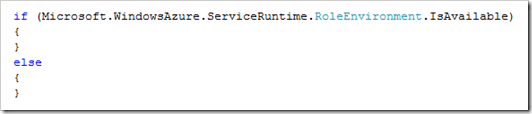
At times you may find it useful to know if you are running inside or outside of the Azure environment (i.e. 1 vs. 2/3/4).

image

Providing you have included the appropriate assembly reference, you can use this API to detect your environment and take appropriate action while developing and testing your components at the stages above.

Looking to learn more about the Windows Azure Platform, Silverlight, Windows Touch or Windows Identify Foundation?

If you’d like to see these sessions in person at Microsoft’s Mix 2010 conference or the recordings that will likely be made available for free later on, please vote for the sessions before January 15th 2010, by going to the site, adding the 3 sessions to you ballot and submitting it

Visual Studio 2010 to Release on April 12 2010

Microsoft previously announced a push-back before the US holiday season, and the addition of a Release Candidate in February 2010.

“In order to ensure that we are able to receive and react to this feedback, we will also be moving the launch of Visual Studio 2010 and .NET 4 back a few weeks.”

Since the RC hasn’t happened yet and the “receive and react to” window is a fixed length of time, it makes me believe that Microsoft is now confident enough about its solution to the performance issues that it can announce a final date with at least the perception of a reaction to the added RC.

Just 2 days Left to Vote for Mix 2010 sessions on Azure, Silverlight, Windows Touch and WIF

Voting ends on Friday for sessions at Microsoft’s Mix 2010 conference.

I’ve submitted 3 session proposals – see the details – around Windows Touch, Azure & Silverlight which were all accepted into the voting list.  My session on Windows Identity Foundation has already been scheduled for the renowned high-level DevTeach 2010 conference at Microsoft’s Canadian HQ this March.

If you’d like to see my sessions in person at Mix or the recordings that will likely be made available for free then please vote for them.

You can find a list of all sessions available for voting  (a list that periodically shuffles its order), or go directly to my sessions here.  You can pick a total of 5 sessions to vote for.

Quick Tip for Hosting Services for Silverlight on Windows Azure

The Silverlight and Azure Tools for Visual Studio 2008 SP1 both provide convenient means to get going with these respective technologies.

Windows Azure is a good place to host services that your Silverlight application may call, as well as the web application that contains the Silverlight application itself.

However, if you’ve tried to get this to work, then you may have encountered as issue.

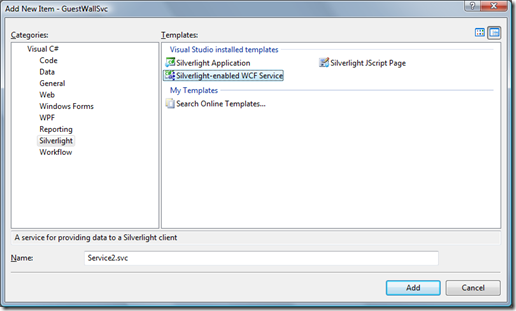
Let’s say you’ve added a Web Role to your Azure application to host the Silverlight application, and you want to add a Silverlight-enabled WCF Service to the website.  You may have tried using the Add New Item dialog to select the “Silverlight-enabled WCF Service” like this…

image

Unfortunately (for reasons I may go into in the future), the Azure platform isn’t going to correctly publish this WCF service in the web role, and your Silverlight app may be able to talk to the service just fine in your development environment, but not when you deploy to Azure proper.

The easiest workaround for this is to create a WCF Role, instead of a Web Role and then add your website files and Silverlight application to that.  The WCF Role exposes a service that is compatible with Silverlight on Azure.

If you check out my Guest Wall application (including source code), you’ll see this in action as well as the code :).

Looking to learn more about the Windows Azure Platform, Silverlight, Windows Touch or Windows Identify Foundation?

If you’d like to see these sessions in person at Microsoft’s Mix 2010 conference or the recordings that will likely be made available for free later on, please vote for the sessions before January 15th 2010, by going to the site, adding the 3 sessions to you ballot and submitting it

Microsoft Announcements at Steve Ballmer’s CES 2010 Keynote

This post was updated live during the keynote on Wed Jan 6th 2010.

All the juicy information on the keynote is below, but first, I’d appreciate 30 seconds of your time to support my session submissions for the Microsoft Mix 2010 conference by voting (follow the link, select a session, add to ballot, back up to repeat for other sessions, then submit the ballot)…

Looking to learn more about the Windows Azure Platform, Silverlight, Windows Touch or Windows Identify Foundation?

If you’d like to see these sessions in person at Microsoft’s Mix 2010 conference or the recordings that will likely be made available for free later on, please vote for the sessions before January 15th 2010, by going to the site, adding the 3 sessions to you ballot and submitting it

Background

Microsoft’s focus for the event

  • Screens woven into the fabric of our lives, specifically the PC and TV experience
  • Cloud – approach that combines power of client and cloud
  • Natural User Interface

Product/Service Announcements

  • Bing will be default search engine and MSN default homepage for HP PCs in 42 countries
  • HTC HD2 with Windows Mobile 6.5 exclusively through T-Mobile in the USA (more to say at phones at Mobile World Congress in Feb 2010)
  • Mediaroom 2.0 – IPTV solution for service providers such as AT&T U-verse (US) – live & on-demand content to the TV, Xbox, PCs (Windows 7 Media Center) & Windows Phones, enabled with Silverlight and IIS Smooth Streaming.
  • New slate form-factor PCs with Windows 7 coming in 2010 – will anyone notice once Apple releases their tablet?
  • Lots of cool games coming to Xbox in 2010 inc. Halo Reach (prequel to Halo 1), Crackdown 2, Fable III, COD MW2 content packs & Alan Wake (… a psychological action thriller delivered in episodes)
  • Xbox Game Room will have 1000+ old-style arcade games (with collaborative showdown) released over next 3 years starting in the spring.
  • Xbox Project Natal scheduled to be available for the 2010 holiday season – no new demos however

Demos/Information

  • Video of Seth Meyers from Saturday Night Live ‘thanking technology for everything is does for us’ (with comic sarcasm) – not sure there was a point to that…
  • There are 39 Million Xbox consoles around the world and 500M+ games sold ($20B+)
  • 11 Million users brought to Bing
  • Windows 7 had 3000 engineers, 50,000 partners and 8M beta testers
  • PC sales jumped nearly 50% the week Windows 7 launched
  • In 2009 33% more PCs sold at US ‘Black Friday’ (traditional retail sale day) than in 2008
  • Windows 7 All-in-ones shown: Lenovo A300 (thinnest on market), Medion Touch, Sony Vaio L
  • Windows 7 Laptops shown: Asus, MSI, Dell Adamo XPS (thinnest on market with very fast wake-up), Asus NX90
  • Windows 7 (‘full version’) Netbooks shown:  Lenovo, Acer, etc.
  • Windows 7 Gaming machines shown: HP NV15, Toshiba X505
  • Windows 7 3D Gaming machine shown: ASUS G51
  • Windows 7 on small-form-factor PCs shown: Acer Aspire Revo, Dell Xeno HD
  • Demo of digital reader with interaction and text to voice – Blio (1M+ books)
  • Demo of SkyDrive, Device Stage, Windows Live & Office 2010
  • Demo of Bing Maps zooming in with StreetSide
  • Demo of Ceton CableCard in Windows 7 Media Center – recording 4 HD channels at one time
  • Demo of what else you can do on the PC while watching TV on it (playing in background) – with horrible audio ‘stuck-record’ repeating glitch ;).
  • Demo of Windows 7 Media Center front-end to CBS (US TV Network)
  • Windows 7 slate form-factors coming in 2010 shown: Pegatron, Arcos & HP, with a video of the HP prototype specifically, with Kindle software running
  • Another Seth Meyes video on the ‘history of things that have happened in technology’… yawn…
  • Between Xmas and new year Xbox LIVE had 2.2M concurrent members online – busiest week ever
  • 20M+ Xbox Live users
  • A new member each second last week
  • A 1/3 of Xbox Live time is on non-gaming activities like buying extra songs, avatar clothing, etc.
  • 20M people have logged into Facebook, Twitter & last.fm, via Xbox Live
  • Demo of Xbox doing HD movie rental with instant streaming

Get further basic details from the MS press release, as well as a further press release about Natural User Interfaces (Voice, Touch and Beyond)

My Sessions at Mix 2010 on Azure, Silverlight, Touch and Windows Identity Foundation

I’ve submitted 3 session proposals for Microsoft’s Mix 2010 Conference in March 2010.

If you’d like to see these sessions in person or the recordings that will likely be made available for free, please vote for these sessions before January 15th 2010, by going to the site and submitting my 3 sessions in your ballot.  Please also get help from anyone else you know :).  Thanks!

Here’s information on the 3 sessions I proposed. 

Session Title

Everything You Touch Turns to Azure (aka the Azure-Touch)

Session Abstract

Feel the rush of power as you learn how to wave your hands and connect directly to your throne in the heavens – OK well you may have to settle for learning about Windows Touch in WPF/Silverlight and the Windows Azure Platform.  This is the future – make sure that everything you touch can turn to Azure.

Session Notes/Outcomes

The session shows how the building blocks of Windows Touch, WPF/Silverlight applications and the Windows Azure Platform can be brought together to create a small yet engaging end-to-end experience.  Attendees should gain insight into the benefits and design of Touch-aware applications on Windows 7 as well as the benefits of backing user experiences with the Windows Azure Platform.


Session Title

Get a WIF of this

Session Abstract

Writing services that understand multiple authentication systems is cumbersome and completely yesterday. Claims-based authentication and authorisation is the way to go. We’ll take a dive into how claims work and what Windows Identity Foundation provides by exploring the key components, but more importantly by building our own identify provider, a claims-based service and a Silverlight application that makes use of it.

Session Notes/Outcomes

WIF recently RTM’d but the identify framework it cements is one of the most overlooked components when it comes to Internet-based application design.  Attendees should leave with a sense of how to create WIF components or WIF-aware components, as well as knowledge of the necessary design considerations.

This session will also be presented at DevTeach 2010 in March at Microsoft Canada’s Head Quarters.


Session Title

The Cloud and the Silver lining

Session Abstract

You need a place to host you Silverlight applications as well as the WCF RIA Services and database that back them.  This session shows you not only that the Windows Azure Platform (featuring Windows Azure, SQL Azure and other services), is a great place to put them, but also how to create the connections between the pieces.

Session Notes/Outcomes

This session digs into the mechanics of a real-world application using Silverlight and the Windows Azure Platform.  Attendees should leave knowing how to easily test against and deploy to the Azure Platform, as well as how communication takes place between the component layers. 

Thanks for your support :).

Windows Azure Platform Now Open for Business

There were some bumps along the way today (like the SQL team saying things were ready for purchase, but there were now Buy Now buttons on the portal for several hours afterwards, and the Billing link went either nowhere or to Microsoft Online Services with no Azure services listed), but… it’s now open for business.  CTP accounts continue to be free until the end of Jan.  See information about the billing on-ramp.

If you on the Azure CTP and you purchase an offer on the Microsoft Online Services site with the same Live ID that you already use for your CTP, then your CTP account will be associated with that plan, so tread carefully.

See my previous entry and the links therein, especially if you are a partner or MSDN subscriber – this isn’t a half bad summary of the options.

Microsoft’s Opening Package Offers for the Windows Azure Platform

Today is the official launch date for Windows Azure Platform and Microsoft is offering 4 packages:

  • $0 – Introductory Special – A (not very useful) level of free consumption until June 30 2010
  • $59.95 – Development Accelerator Core
  • $109.95 – Development Accelerator Extended
  • $Varies – Consumption – pay for what you use

Check out the official comparison table.

For a minute, I thought Microsoft was really serious about promoting this, but the Introductory Special is somewhat pointless – it’s more of a discount or minor test package.  It includes 25 computer hours which is just over one day of operation per month on one node – think of it as one free day on one node.  It does come with 1GB of SQL Azure, but that’s also only for 3 months :(.  There’s also 100,000 AppFabric messages and a measly 1/2 GB of data transfer in/out.  So, you can do some testing with this, although if you are an MSDN subscriber you have addition options.

Now the next two packages are better with both packages offering 750 hours of Windows Azure compute time which equates to 1 node for a month, e.g. a website.  The Extended plan includes a 10GB SQL Azure database, normally priced as $99.95 per month on its own.

The Consumption plan is apparently what you pay if you go over the included quantities.  With some other providers, the overage fees go down as one moves to higher pre-paid packages.

Microsoft can beat other providers when it comes to the SQL Azure offering.  Other providers, who have to license SQL Server to customers through Microsoft’s Service Provider License Agreement, may pay Microsoft over $200 a month for a SQL Standard processor license.  Microsoft is offering a 1GB SQL Server for $9.99 per month and $10GB for $99.99.

I need to do further analysis on provider price comparisons in the future.  I make solid use of GoGrid who consider themselves an infrastructure provider and Microsoft to be a platform provider, though they both offer cloud computing.  With GoGrid, I do all the server admin (while they provide cloud nodes, network, admin UI/API and other services) while Microsoft is aiming to cover lots of the redundancy infrastructure automatically.

In addition to these offers and the MSDN subscriber offer, there’s also a special rate version of the 3 paid plans for Microsoft Partner Network members – currently stated as being 5% off the regular rates (but not applying to data transfer or Windows Azure storage).  It’s not clear yet how all these offers/packages operate together if at all.  Do the MSDN subscriptions provided with Partner accounts each qualify?  According to the notes on the offer pages for migration a CTP account to, “Your CTP account(s) are automatically associated with the first offer you purchase with that Windows Live ID.”

I have not yet received any information on how to upgrade to a commercial account and the Billing link on the portal goes to the Microsoft Online Services portal which doesn’t show anything about Azure.  I can hear the Microsoft elves sweating right now along with the patter of tiny feet to refill the free soft drinks 🙂

P.S.  Hopefully the grammer elves will ‘shoot’ the ignorant Microsoft website elves using the phrase “a …savings” 😛

Windows Azure Platform Goes Live Today

Today is the day for Azure to go live.

What this means (according to communicating to Community Technology Preview participants) is that Microsoft should start issuing instructions this week on how to move from CTP to a commercial account.

It’s also not clear yet, how the relationship will work yet (and there are some broken links from the Azure portal) between billing, portal account and login ID, but I imagine there needs to be Live IDs for the billing accounts and then permitted administrator Live IDs for the portal.

The Windows Azure Platform continues to be free until Feb 1 2010, during the first billing on-ramp phase.

If you are interested in giving Windows Azure a spin while it’s still free in January then you may want to try this Azure deployment guide with included sample application, successfully used by hundreds of people.

More posts soon on some of the insights of building a Silverlight application and hosting it on Windows Azure…